FW/1 and Service Beans in ColdSpring

Recently I started switching from a Model-Glue implementation with ColdSpring to FW/1 (Framework One) with ColdSpring on a project of mine.

An example service bean definition looks like this:

<bean id="geographic" class="geographicService" />

With the new FW/1 code, I tried calling a method in this service by using:

variables.fw.service ( 'geographic.getStatesByCountry', 'states' );

But ended up with this error:

Service ‘geographic.getStatesByCountry’ does not exist. To have the execution of this service be conditional based upon its existence, pass in a third parameter of ‘false’.

After hours of debugging, my team member finally found a solution; change the bean id from geographic to geographicService. Apparently FW/1 automatically appends “Service” to the bean ID it references so that it can cache services and controllers that way. This appears to be lacking in the FW/1 documentation, or at least clearly.

So the fix is:

<bean id="geographicService" class="geographicService" />

#beans, #coldfusion-2, #coldspring, #framework, #fw1

Console Logging of ColdFusion ORM SQL

If you read my post on getting the ColdFusion Builder Console working and use ORM, you may have run into some further questions.

When generating ORM, it’s wise to monitor what SQL queries Hibernate is generating for you, both for performance and debugging reasons. (Wasn’t ORM supposed to make my life easier?).

To start logging ORM’s SQL set this property in your application.cfc:

<cfset this.ormsettings.logsql="true">

You’ll may notice however that the default configuration will not show DDL queries used for creating or updating tables nor will it show the parametrized values (just a ?).

To enable these things look at <cf_home>\lib\log4j.properties (in my case it’s C:\ColdFusion9\lib\log4j.properties).

To enable logging of parametrized values uncomment and change the value for log4j.logger.org.hibernate.type to look like this:

log4j.logger.org.hibernate.type=DEBUG

It seems like a little overkill on what this ends up returning because not only will it return your parametrized values but also what each column returns. I wish I could disable the latter.

To enable logging of exports and updates (DDL) uncomment and change the value for log4j.logger.org.hibernate.tool.hbm2ddl to look like this:

log4j.logger.org.hibernate.tool.hbm2ddl=DEBUG, HIBERNATECONSOLE

I placed an example snippet below. Thanks to Rupesh Kumar for providing this information.

#sql-queries

SQL to ColdFusion ORMType Reference

I have not been able to find a good reference chart out there that maps SQL Data Types to ColdFusion ORM Data Types. It’s always really been my best guess. So I’m going to start a reference chart here that as I figure it out I’ll update. If you have any input on this please comment and I will update. Thanks!

ORMType SQL MySQL
big_decimal DECIMAL, MONEY DECIMAL
binary BINARY, VARBINARY TINYBLOB
blob TINYBLOB
Boolean [SMALLINT], BIT BIT
clob LONGTEXT
date DATE DATE
double DOUBLE, MONEY, NUMERIC DOUBLE
character, char CHAR
float REAL, FLOAT FLOAT
integer, int INT INT
long BIGINT BIGINT
serializable TINYBLOB
short SMALLINT SMALLINT
string CHAR, NCHAR, VARCHAR, NVARCHAR VARCHAR
text TEXT, NTEXT LONGTEXT
timestamp DATETIME, SMALLDATETIME, TIMESTAMP DATETIME
true_false CHAR
yes_no CHAR

Camel Case for Two Letter Acronyms

Here’s another “for later reference”…

Microsoft’s rules for .NET Framework 1.1 Abbreviations consist of:

  • Do not use abbreviations or contractions as parts of identifier names. For example, use GetWindow instead of GetWin.
  • Do not use acronyms that are not generally accepted in the computing field.
  • Where appropriate, use well-known acronyms to replace lengthy phrase names. For example, use UI for User Interface and OLAP for On-line Analytical Processing.
  • When using acronyms, use Pascal case or camel case for acronyms more than two characters long. For example, use HtmlButton or htmlButton. However, you should capitalize acronyms that consist of only two characters, such as System.IO instead of System.Io.
  • Do not use abbreviations in identifiers or parameter names. If you must use abbreviations, use camel case for abbreviations that consist of more than two characters, even if this contradicts the standard abbreviation of the word.

These appear to be good guidelines to follow for ColdFusion as well. I was going after casing for two letter acronyms in this case.

REF: http://msdn.microsoft.com/en-us/library/141e06ef(v=vs.71).aspx

Looping Over Arrays in ColdFusion 9.01 (CFScript)

This is pretty much a “note to self”… but in ColdFusion 9.01 you can now loop over arrays using the  for – in loop while in cfscript.

Syntax is:

for(item in array) {
    doSomething(item);
}

#array, #arrays, #coldfusion-2

My New Experience Getting ColdFusion Builder 2 Console Working

I have ColdFusion 9 Developer Edition installed on my Windows 7 machine running IIS7. Normally my ColdFusion 9 Application Server service starts automatically for me.

Recently I have started learning and developing with ORM. Because of this, I need to figure out what ORM is asking the SQL server to make sure it’s not doing anything crazy.

To do this I turned on logsql in ormSettings config in application.cfc. Then found that it would log to a file or the Console view.

But alas, nothing showed in my Console view, and yep, I did have a server configured in the Servers view.

So I find out that I need to stop/start the server in the servers view to get this working. After trying that it pretty much lied to me and said it did when it really didn’t.

At that point I stopped the service in the Windows service and tried to start from ColdFusion Builder. No such luck.

Then I tried restarting ColdFusion Builder w/ Administrator rights. BAM – now I can get the CF service started.

But I notice something interesting. The service in the Windows Service Manager still shows stopped after a refresh. But alas my Console works perfectly.

So I have no idea what is going on, but this is what I figure needs to happen to get this all working correctly:

  1. Change the ColdFusion 9 Application Server properties of startup type to manual and stop the service.
  2. Close ColdFusion Builder if already open and start it as Administrator (right click icon and select Run As Administrator)
  3. In the Servers View in ColdFusion Builder, edit your server config and auto start and stop the CF Server. (optional but recommended… If you close CF Builder, you will need to restart the server anyway)
  4. Select your server and click the green run arrow.
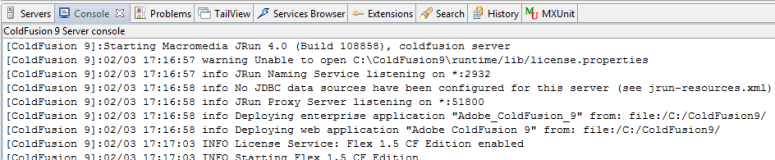
  5. You should see ColdFusion startup with a bunch of output in the Console at this point.
At this point I would suggest modifying your shortcut to always run as administrator. This has gotten me many times already, so I finally made this change.
  1. Right click shortcut and select properties
  2. Click Advanced button
  3. Turn on “Run as administrator”
  4. OK > OK

What a mess! Needs to be a slicker way of getting this rolling without an hour of research and messing with Administrator rights. But hope this helps my memory and anyone else scratching their head!
#orm

Proper Parentheses Placement In Ternary Statements

Consider the following code:

a = b = c = 1000000;
r = (a > 10000) ? a/1000 : a & "/" & (b > 10000) ? b/1000 : b & "/" & (c > 10000) ? c/1000 : c;

(if you think the first line is odd – see Chaining ColdFusion Assignment Operators)

My thought was r would return “1000/1000/1000” — however it actually returned “1000”. Where did I go wrong?

Now if I change a,b,c to 1000 it would blow up to a “cannot convert the value “1000/NO” to a boolean” error.

So what’s going on? The third argument of the statement becomes another ternary statement but can not convert the evaluated “1000/NO” to a Boolean – thus blowing up. If a,b,c = 1000000 then the operation never gets to the third argument and returns only “1000” never considering the ampersand in its logic.

So correct code would be:

a = b = c = 1000000;
r = (a > 10000 ? a/1000 : a) & "/" & (b > 10000 ? b/1000 : b) & "/" & (c > 10000 ? c/1000 : c);

Or depending upon your preference:

a = b = c = 1000000;
r = ((a > 10000) ? a/1000 : a) & "/" & (b > 10000) ? b/1000 : b) & "/" & (c > 10000) ? c/1000 : c));

Now there are three seperate ternary statements concatenated together with a slash between them.

Serving Files with Spaces in the File Name Using CFContent

I ran into an issue where using CFContent to serve a file with spaces in its name was truncating the file name. For example the file “Foo Bar.xls” was saving as “Foo”, lacking ” Bar.xls”.

<cfheader name="Content-Disposition" value="attachment; filename=#getFileFromPath(filePath)#">
<cfcontent file="#filePath#" type="application/octet-stream">

You can find many examples of this type of code out there for securing files using ColdFusion and its cfcontent, so apparently it’s a common oversight.

The fix to truncated file names is very simple but no so obvious.

What doesn’t work:

  1. Don’t wrap the file name value in anything
  2. Wrapping the file name value in single quotes
  3. Wrapping the file name value in double quotes

What does work:

  1. Wrap the file name value in escaped quotes (doubled up such as “”#filename#””)
  2. Wrap the file name value in character valued double quotes (chr(34))

The new example would look something like this:

<cfheader name="Content-Disposition" value="attachment; filename=""#getFileFromPath(filePath)#""">
<cfcontent file="#filePath#" type="application/octet-stream">

Thanks to Ben Nadel for providing this solution.

See my previous blog on serving files with CFContent at https://christierney.com/2009/08/12/securely-serving-files-via-cfcontent/ .

Chaining ColdFusion Assignment Operators

Thanks to Mike Henke, I found out you can chain assignment operators (“=”) in ColdFusion.

An example of this would be:

var1 = var2 = var3 = 123;

Resulting in:

var1 = 123
var2 = 123
var3 = 123

Behind the scenes it’s interpreted such as var1 = (var2 = (var3 = 123));
(It is right-associative, being the last assignment operation is evaluated first and propagated leftward. Also, don’t try that interpreted code in CF because it will fail.)

While not a major find in programming history, this little flick of keystrokes can save you some repetitive typing should you ever need to set multiple variables to the same value.

Read XML from a HTTP POST

I program scripts to read XML posts just every once-and-awhile, and although very simple, every-time I forget how to do it.

Let’s say that we receive a XML HTTP POST via this code:

<cfhttp url="http://yourdomain.com/xml.cfm" method="post">
<cfhttpparam type="XML" name="MyXML" value="#myxml#">
</cfhttp>

This is what you would use to read that POST:

<cfset xmlPOST = GetHTTPRequestData().content>
<cfset xmlDOM = XmlParse(xmlPOST)>

The key here is the GetHTTPRequestData().content. Notice how we do not use form.MyXML.

Now we can manipulate the XML data using standard dot notation such as xmlDOM.Content.Value.XMLText.