SSIS Import/Export Wizard: “Unexpected Unrecoverable Error”

Using Microsoft’s SQL Server Management Studio’s Import and Export Wizard, I would get “Unexpected Unrecoverable Error” message when I would click “Messages…” or view a report when an import failed. This was very annoying and I wasn’t getting any work done this way.

Thanks to the SQL Server Forums I was able to resolve this issue by installing the Extended .NET Framework 4. If you have the Client Profile version installed, you will still apparently get this error. Be sure to do a Windows Update after the install as there is a security patch for it.

BTW, this import Wizard is a big fail for Microsoft. SQL Server 2000’s version did much more – now my life is just plain more difficult thanks to their “upgrade” – just say’n.

I am running SQL Server Management Studio 2008 R2 64-Bit on Windows 7 64-Bit.

Returning Multiple Value Elements to ColdFusion Remote Method via jQuery AJAX

Lets say I have a select element that supports multiple selected values:

<form>
<select id="mySelect" multiple size="3">
<option value="1">1</option>
<option value="2">2</option>
<option value="3">3</option>
</select>
</form>

I wish to return this information to my ColdFusion CFC that contains a remote method via AJAX:

$.ajax({
	type: 'POST',
	url: 'myCFC.cfc',
	dataType: 'JSON',
	data: {
		'method':'myMethod',
		'value':$('mySelect').val()
	}
});

My CFC method looks like:

<cffunction name="myMethod" access="remote" output="false">
	<cfargument name="value" required="true" type="string">

	<cfset local.myVar = arguments.value>
	<!--- more logic --->
</cffunction>

This solution will error out due to the fact that the key “value” passed via AJAX is actually passed as “value[]”. Note the appended brackets denoting an array. I can’t reference “#arguments.value[]#” as this tries referencing an array and “#arguments[‘value[]’]#” is not allowed.

I tried all sorts of ways to try and get at that key value in the method. The only way I could come up with was to reference the argument via an index such as “arguments[1]”. But my real code was too complex to rely upon this method.

Another way was to append “.toString()” call the the end of the “val()” call when retrieving the values selected. This converts the array of values to a comma-delimited string of values. However this method will not allow the use of commas.

What I ended up doing was inserting some logic to convert any arrays into a pipe-delimited list. It’s not the best solution in the world but I think it’ll work.

var thisVal = $(this).val();
if ($.isArray(thisVal))
	var thisValRtn = thisVal.join("|");
else
	var thisValRtn = thisVal;

$.ajax({
	type: 'POST',
	url: 'myCFC.cfc',
	dataType: 'JSON',
	data: {
		'method':'myMethod',
		'value':thisValRtn
	}
});

If you have a better method than this, I’d love to hear about it.

What Constitutes an Attribute or Property in jQuery 1.6.1

jQuery 1.6.1 RC1 was released today, helping resolve the .attr() backwards compatibility issue along with a few other fixes.

jQuery.com released a nice chart on what .attr() and .prop() should be used for going forward from jQuery 1.6+. I thought I’d publish this for future reference. Note that all properties can still be accessed via 1.6.1, but not necessarily via 1.6.

According to jQuery.com the .prop() method should be used for boolean attributes/properties and for properties which do not exist in html (such as window.location). All other attributes (ones you can see in the html) can and should continue to be manipulated with the .attr() method.

Attribute Property
accesskey async
align autofocus
class checked
contenteditable location
draggable multiple
href readOnly
id selected
label
rel
src
tabindex
title
type
width

Understanding jQuery 1.6’s DOM Attribute and Properties

jQuery 1.6 released a significant change to the way it handles DOM attributes and properties.

Take for example in version 1.5.2, the following code would return isCheckedAttr as “true”.

<input type="checkbox" checked="checked" />

<script type="text/javascript">
var isCheckedAttr = $('input').attr("checked");
</script>

In version 1.6 the addition of .prop() and .removeProp() changes what the .attr() method will return when referencing DOM properties. The following example will return isCheckedAttr as “” and isCheckedProp as “true”. Notice 1.5.2 returned “true” instead of “” for isCheckedAttr.

<input type="checkbox" checked="checked" />

<script type="text/javascript">
var isCheckedAttr = $('input').attr("checked");
var isCheckedProp = $('input').prop("checked");
</script>

Now… check this out. In HTML and XHTML you can set the checked property as an attribute. This example in jQuery 1.6 will return “checked” for isCheckedAttr (remember 1.5.2 returned “true”). The isCheckedProp will still return “true”.

<input type="checkbox" checked="checked" />

<script type="text/javascript">
var isCheckedAttr = $('input').attr("checked");
var isCheckedProp = $('input').prop("checked");
</script>

Try this case on for size… If I don’t set the checked attribute or property isCheckedAttr will always return “undefined” (not an empty string) and isCheckedProp will return false (until I click the checkbox which will make it true).

<input type="checkbox" />

<script type="text/javascript">
var isCheckedAttr = $('input').attr("checked");
var isCheckedProp = $('input').prop("checked");
</script>

This all makes sense, though a bit confusing since the attribute is basically converted into a property at DOM load making upgrading to version 1.6 much more difficult than most recent version upgrades, so be sure to do some extra testing.

Okay, ready for this, one more item to throw at you… if I’m reading the bug ticket right, if an attribute does not exist but the property does, the .attr() will bring back the property boolean value as the attribute in the next release (probably 1.6.1). This appears to be a backwards compatibility fix for reading properties, but not setting them.

UPDATE 5/9/2011: appendTo, a jQuery company I highly respect, released an executive brief on jQuery 1.6 stating that it recommends not upgrading to jQuery 1.6 until 1.6.1 is released. This version will return either the name of the attribute (if true) or undefined (if false) for .attr(BooleanAttribute) and could be released as early as Tuesday, May 10, 2011. It also has a good read on the rest of the features new to this version.

John Resig also released an example:

“Let’s pretend we’re working with a checkbox that isn’t checked at all:

<input type="checkbox" id="c"/>

$("#c").attr("checked") => false // 1.5.2
$("#c").attr("checked") => undefined // 1.6
$("#c").attr("checked") => undefined // 1.6.1

The user then checks the checkbox OR we set the check by doing .prop(“checked”, true) OR we set the check by doing [0].checked = true, the result would be:

$("#c").attr("checked") => true // 1.5.2
$("#c").attr("checked") => undefined // 1.6
$("#c").attr("checked") => "checked" // 1.6.1

Note that if we had done .attr(“checked”, “checked”) OR .attr(“checked”, true) to set the checked property then .attr(“checked”) would’ve returned “checked” in both 1.6 and 1.6.1.

In short: In jQuery 1.6.1 .attr(BooleanAttribute) now returns either the name of the attribute (if true) or undefined (if false). Which is consistent with the rest of the API and with the DOM itself.

I should note that all of this is a moot point if you’re using .prop(“checked”) – that will just return true/false consistently based upon the current checked state of the checkbox.”

ColdFusion Builder Standard vs. Express

Yesterday Adobe ColdFusion Builder 2 was released. With this includes the option to pay for a license ($109 upgrade / $299 full) or to use the express edition for free after your 60 full featured trial.

Referencing a couple of matrix charts from Adobe here’s some key differences between ColdFusion Builder 1, ColdFusion Builder 2 Standard, and ColdFusion Builder 2 Express. Only new features are being referenced.

ColdFusion Builder 1 ColdFusion Builder 2 Standard ColdFusion Builder 2 Express Notes
Search your application for specific tags, attributes, and text, regardless of file location X This is the new ColdFusion Search feature. You can still use the standard Search and File Search features. [Ctrl+F]
Navigate to the next logical tag, function, or control statement within your code X X  [Ctrl+Shift+Up/Down]
Set “to do” and “fix me” points within your code X X
Access methods and attributes within a ColdFusion component (CFC) that have not yet been created X X
Indicate an application start page to execute first when running and debugging applications X X
Create customized keyboard shortcuts or modify existing ones X X
Apply code formatting based on personalized, predefined rules X  [Ctrl+Shift+F]
Install ColdFusion Builder 2 as a plug-in to any Eclipse™ 3.6 64-bit environment X X
Code Insight X X
Extensions X X X Express does not support callbacks and code assist for extensions
Refactoring X X
FTP Support X X
Remote Project X X
Server Manager X X X Express will only allow local host
Quick Fix X [Ctrl+1]
Tailview X X
Local File Browser X X
Custom and Persistent Code Folding X X
Tag Block Selection X X [Ctrl+Alt+B]
Jump to Matching Tag X X [Ctrl+Alt+M]
Debugging X X
Log Viewer X X

http://www.adobe.com/products/coldfusion-builder/buying-guide.html
http://blogs.adobe.com/cfbuilder/2011/05/feature-matrix-for-full-vs-express-edition-of-coldfusion-builder-2.html
http://www.adobe.com/devnet/coldfusion/articles/cfb2-whatsnew.html

All of the above information is gathered from the above links. If you find an inaccuracy please let me know and I will update the matrix appropriately. Thanks!

Some Oohs and Aahs in ColdFusion Builder 2

While doing a little tinkering in my ColdFusion Builder 2 Beta I accidentally ran across some features while editing a ColdFusion file. These appear to be all new from version 1 and will be a great time-saver for me!

Code hyperlinks for CFCs and UDFs
Component names and UDFs are hyperlinked if you press Ctrl and hover over the object name. Clicking the hyperlink opens the corresponding code. According to Adobe Help, code hyperlinks are available for:

  • UDFs: local, included, and cfc.udfName
  • Template in <cfinclude template=””>
  • CFCs in createobject(), <cfobject>, <cfinvoke>, new keyword, and extends attribute.

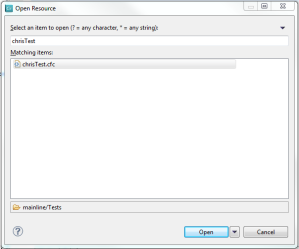
Ctrl+Shift+R (Open Resource…)
Another resource worth mentioning, but is not new is the Open Resource window. Apparently it’s been around a long time in Eclipse, but I just learned about it.
When you open the window, you can start typing a name of a file which will bring up a list a matching files located in your project. For example “tests” may bring up “TestSuite.cfc”, “TestSimple.cfm”, and “TestSomething.html”. In addition you can select the resulting file to find its path and open it either in its specific or default editor.

However the best part of this is if you highlight a file reference in your code, then press Ctrl+Shift+R it will bring that highlight into the search filter readily giving you access to the file you are searching for. This can be especially handy if you can’t use the code hyper-link due to component searching, which ColdFusion Builder can’t resolve yet.

Explore Files and Copy Path(s) to Clipboard
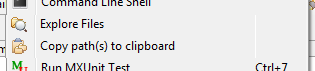
While a file is open to edit, right click for the context menu. Here you will see two commands listed:

  • Explore Files
  • Copy path(s) to clipboard

“Explore Files” will open your Windows Explorer to the path of that currently open file and focus to the file name.

“Copy path(s) to clipboard” will copy the path of the open file to your clipboard. Example: “C:\websites\myfile.cfm”

Playing Interference with jQuery and Prototype

Lately I’ve had to deal with jQuery conflicting with Prototype.

For starters I was forced to upgrade from jQuery 1.4.2 to 1.5.2 to fix a conflict when doing clones.

But of course there’s always the ‘$’ conflict. So I wanted to come up with a slick way of keeping the ‘$’ alias available for use by jQuery code.

For starters the existing code looks like this:

<script src="prototype.js" type="text/javascript"></script>
<script src="jQuery.min.js" type="text/javascript"></script>
<script type="text/javascript">
	jQuery.noConflict();
	jQuery(document).ready(function(){
		/* js code here */
	});
</script>

The ‘jQuery.noConflict()’ statement kills off the jQuery ‘$’ alias for me. So to have ‘$’ available for my use I wrapped everything around a Self-Invoking Anonymous Function looking like this:

(function( $ ) {
	$(document).ready(function() {
		/* js code here */
	});
})(jQuery);

https://gist.github.com/firefighter990/5340332

Notice that the jQuery object is now being passed in via the $ argument inside a JavaScript closure. Thus everything I do inside the closure will not conflict with any other library.

Simple HTML5

I keep going back to look and see what is actually required as a minimum for HTML5 markup, so I thought I’d blog it for easy reference.

The non-normative minimum markup for HTML5 is:

<!DOCTYPE html>
<html>
 <head>
  <title></title>
 </head>
 <body>
 </body>
</html>

Notes:

  • The DOCTYPE is required for legacy reasons. Including the DOCTYPE in a document ensures that the browser makes a best-effort attempt at following the relevant specifications.
  • HTML is not case sensitive
  • A closing slash is not needed for self-closing elements
  • A link element must have a rel attribute. If the type attribute is omitted on an external reference it will default to the MIME type of the file being referenced. For example if the href is “mycss.css”, the type will become “text/css”.
  • If no type is defined for the style element, then it defaults to “text/css”
  • If no type attribute is defined for the script element, then it default to “text/javascript”

#html5, #template

Coldfusion Builder 2 Beta and jQuery Code Assist

I am currently using ColdFusion Builder 2 Beta for my primary projects. One item I noted was the lack of jQuery code assist.

I did find a way to turn code assist on for jQuery 1.3. After some research I really haven’t found a way to include 1.4, 1.5 or 1.6RC. But 1.3 is better than nothing.

To turn on jQuery 1.3 code insight go to [ preferences > HTML > Editors > JavaScript > Code Assist ] and select jQuery 1.3. After you click [OK] jQuery code insight will work right away.

If anyone knows how to upgrade the versions w/o major work please let me know. Thanks!

Can Not Edit Hierarchyid in MS SQL SMS Editor

I’m basing my current project around SQL 2008’s hierarchyid data type, which is completely new to me. One frustrating issue I have found is the inability to edit any hierarchyid type’s data as a string inside the Microsoft SQL Server Management Studio’s edit feature. Granted I can control the data via the New Query feature, but I tend to use the interactive editor for quick and easy access to my data during the development process.

Take the following example:

Notice the hierarchyid data is converted into a string to be shown. However if you where to try and update the current value of ‘/1/’ to ‘/1/1/’ or update the current NULL value to ‘/1/1/’ then you would receive an error stating “Invalid cast from ‘System.String’ to ‘Microsoft.SqlServer.Types.SqlHierarchyId'”.

I’m not sure what data would even be acceptable in the field. I tried entering ‘0x5AC0’ for the NULL data and still received an error.

So from what I can see is this data type is unchangeable inside the editor.

The workaround for this would be to run the following TSQL:

UPDATE Table1
SET Question_Hierarchy_ID = '/1/1/'
WHERE ID=1