max_reuse_connections Conundrum: ColdFusion 11 Tomcat IIS Connector

This is my first attempt at IIS connector tuning for ColdFusion 11 (and 10). Most of my career has been spent developing ColdFusion code and is now focusing more on server related activities. Plus CF 10 and 11 were slow to be implemented by our customers.

It seems that most information out there for connector tuning is based around one sole blog post: http://blogs.coldfusion.com/post.cfm/coldfusion-11-iis-connector-tuning (and CF 10’s version).

My post focuses on a three instance approach, using ColdFusion 11 Enterprise, with individual site connectors (as opposed to “all IIS sites”).

The basic concept as I understand it is to set the connection_pool_size to 500 and monitor the site. Add up this number in each site, using the same instance, and use that value for maxThreads for the AJP connector setting. Then gradually increase that value by 100 under load testing conditions until stable. Then give that number some wiggle room for future growth. After that number is set, then set the max_reuse_connections and connection_pool_timeout.

So lets say, as an example, that I use the “All IIS Sites” option for my connector instead of individual connectors. If I use the recommended connection_pool_size of 500 for each site, I’d use 3000. Then based upon the equation of connection_pool_size / # of sites, I’d set “max_reuse_connections = 500”. Example:

worker.list=instance1
worker.instance1.type=ajp13
worker.instance1.host=localhost
worker.instance1.max_reuse_connections=500
worker.instance1.connection_pool_size=3000
worker.instance1.connection_pool_timeout=60

<Connector port="8013" protocol="AJP/1.3" redirectPort="8446" tomcatAuthentication="false" maxThreads="3000" connectionTimeout ="60000"/>

Now, when I looked up the workers.properties specs for Tomcat I found that max_reuse_connections is not a standard property. I’m assuming this is one of the customizations made by Adobe. Based upon how the value of this property is a division of the number of sites, that this property is per site. Therefore in conclusion, I have up to 500 connections to reuse for each site in my total pool of 3000.

Now, lets say we’re using individual connectors. Each of the six workers.properties would look like this based upon Adobe’s blog:

worker.list=instance1
worker.instance1.type=ajp13
worker.instance1.host=localhost
worker.instance1.max_reuse_connections=83
worker.instance1.connection_pool_size=500
worker.instance1.connection_pool_timeout=60

<Connector port="8013" protocol="AJP/1.3" redirectPort="8446" tomcatAuthentication="false" maxThreads="3000" connectionTimeout ="60000"/>

So, as per Adobe’s blog, connection_pool_size / # of sites rounds down to 83, instead of 500. 6 sites X 500 connection_pool_size = 3000, which is reflected in the instance’s server.xml file.

In the end, the instance still allows for 3,000 connections; 500 coming from each site.

Question: Why am I using the same calculation for max_reuse_connections when combining all sites or connecting them individually? Shouldn’t I be able to use up to the value of each connection_pool_size for each connector? If max_reuse_connections is for each site, shouldn’t that number be the same no matter individual or “All IIS” connector types?

For example:

worker.list=instance1
worker.instance1.type=ajp13
worker.instance1.host=localhost
worker.instance1.max_reuse_connections=500
worker.instance1.connection_pool_size=500
worker.instance1.connection_pool_timeout=60

<Connector port="8013" protocol="AJP/1.3" redirectPort="8446" tomcatAuthentication="false" maxThreads="3000" connectionTimeout ="60000"/>

IIS URL Multiple Specific Character Find/Replace

Today’s challenge at CF Webtools for myself was to find and replace any “_” (underscore) characters in a URL .htm file name and replace it with “-” (dash). The list I was given had file names with up to 7 underscores in any position. Example: my_file_name.htm

While I figured this would be a straight-forward task with IIS URL Rewrite, I was wrong.

In the end I found that I either had to create one rule for each possible underscore count or write a custom rewrite rule. I went the one rule per count route. I read in one blog you can only use up to 9 variables ({R:x}).

The other part of the rule was they had to be only in the “/articles/” directory.

My first challenge was just to get the right regular expression in place. What I found out was that the IIS (7.5) UI’s “Test Pattern” utility doesn’t accurately test. In the test this worked:

Input: http://www.test.com/articles/my_test.htm
Pattern: ^.*\/articles\/(.*)_(.*).htm$
Capture Groups: {R:1} : "my", {R:2} : "test"

However, this does not match in real-world testing. #1, don’t escape “/” (forward-slash) (really??). #2 the pattern is only matched against everything after the domain and first slash (http://www.test.com/).

So really, only this works:

Input: http://www.test.com/articles/my_test.htm
Pattern: ^articles/(.*)_(.*).htm$
Capture Groups: {R:1} : "my", {R:2} : "test"

In order to match against up to 8 underscores, you need 8 rules, each one looking for more underscores. So the next one would be:

Input: http://www.test.com/articles/my_test_file.htm
Pattern: ^articles/(.*)_(.*)_(.*).htm$
Capture Groups: {R:1} : "my", {R:2} : "test", {R:3} : "file"

To do this efficiently you just edit the web.config in the web root for that site. The end result ended up being:

<?xml version="1.0" encoding="UTF-8"?>
<configuration>
    <system.webServer>
        <rewrite>
            <rules>
                <rule name="AUSx1" stopProcessing="true">
                    <match url="^articles/(.*)_(.*).htm$" />
                    <action type="Redirect" url="articles/{R:1}-{R:2}.htm" />
                </rule>
                <rule name="AUSx2" stopProcessing="true">
                    <match url="^articles/(.*)_(.*)_(.*).htm$" />
                    <action type="Redirect" url="articles/{R:1}-{R:2}-{R:3}.htm" />
                </rule>
                <rule name="AUSx3" stopProcessing="true">
                    <match url="^articles/(.*)_(.*)_(.*)_(.*).htm$" />
                    <action type="Redirect" url="articles/{R:1}-{R:2}-{R:3}-{R:4}.htm" />
                </rule>
                <rule name="AUSx4" stopProcessing="true">
                    <match url="^articles/(.*)_(.*)_(.*)_(.*)_(.*).htm$" />
                    <action type="Redirect" url="articles/{R:1}-{R:2}-{R:3}-{R:4}-{R:5}.htm" />
                </rule>
                <rule name="AUSx5" stopProcessing="true">
                    <match url="^articles/(.*)_(.*)_(.*)_(.*)_(.*)_(.*).htm$" />
                    <action type="Redirect" url="articles/{R:1}-{R:2}-{R:3}-{R:4}-{R:5}-{R:6}.htm" />
                </rule>
                <rule name="AUSx6" stopProcessing="true">
                    <match url="^articles/(.*)_(.*)_(.*)_(.*)_(.*)_(.*)_(.*).htm$" />
                    <action type="Redirect" url="articles/{R:1}-{R:2}-{R:3}-{R:4}-{R:5}-{R:6}-{R:7}.htm" />
                </rule>
                <rule name="AUSx7" stopProcessing="true">
                    <match url="^articles/(.*)_(.*)_(.*)_(.*)_(.*)_(.*)_(.*)_(.*).htm$" />
                    <action type="Redirect" url="articles/{R:1}-{R:2}-{R:3}-{R:4}-{R:5}-{R:6}-{R:7}-{R:8}.htm" />
                </rule>
                <rule name="AUSx8" stopProcessing="true">
                    <match url="^articles/(.*)_(.*)_(.*)_(.*)_(.*)_(.*)_(.*)_(.*)_(.*).htm$" />
                    <action type="Redirect" url="articles/{R:1}-{R:2}-{R:3}-{R:4}-{R:5}-{R:6}-{R:7}-{R:8}-{R:9}.htm" />
                </rule>
            </rules>
        </rewrite>
    </system.webServer>
</configuration>

In the end this URL:

http://www.domain.com/articles/my_file_foo_bar.htm

becomes:

http://www.domain.com/articles/my-file-foo-bar.htm

#iis, #replace, #url, #url-rewrite

Manual Windows 2008 Registry Restore

After a Windows Update the lovely “Blue Screen of Death” appeared on one of our servers. Frantic to find a solution, “Boot to the last known working configuration” wasn’t working. A system restore was a last resort option.

Here’s what the error consisted of:

STOP: c0000218 {Registry File Failure}
The registry cannot load the hive (file):
\Systemroot\System32\Config\SOFTWARE
or its log or alternate.
It is corrupt, absent, or not writable.

To resolve the issue I:

  1. Boot to the Windows 2008 Server Install DVD
  2. Click “Repair Computer” on the second screen
  3. Open a command prompt on the second or third prompt
  4. Change directory to C:\Windows\System32\Config\
  5. Rename “SOFTWARE” to “SOFTWARE.BAK”
  6. Copy “RegBack\SOFTWARE” to that directory
  7. Reboot

This restored the SOFTWARE registry to its previous state before the Windows Update. I then had a pending list of Windows Updates to install again. But I’ll leave that for another day for now to see if anyone else is having issues.

#blue-screen-of-death, #microsoft, #registry, #update, #windows, #windows-2008-server

ColdFusion Builder 3 Fuzzy Features

Between ColdFusion Builder 2 and 3, I used Sublime Text editor for about a year. One of the best features that Sublime Text had was fuzzy searches.

For example, on code assist, for a cfqueryparam attribute, I could type “var” and get type=”cf_sql_varchar”. In ColdFusion Builder, you’d have to type “cf_sql_v” to get the same. May not seem like much, but when your brain is focusing on the differences, why should I have to type “cf_sql_” when everyone has that?

Another example would be when using the “Goto Anything” feature, I regularly knew approximately what file name I was looking for, but maybe not exact. So if I type “page”, I may get 30 results. Then I continue to type to get “pagedsp” and find my file “pagedisplay.cfm”. Very handy and quick.

In ColdFusion Builder 3, everything relies upon starting from the beginning of line and pretty exact. It’s very rigid. The file content searches also always take a bit of time.

2014-05-23_1654


The alleviate the file search issue, I installed the InstaSeach plugin : http://marketplace.eclipse.org/content/instasearch

This plugin instantly returns fuzzy results if your keyword matches text inside the current open file, a file name or content inside a file — INSTANTLY —

Highly recommend to replace your Search > File and Search > Search


To alleviate the code assist issue:

Go to Preferences->ColdFusion->Profiles->Editor->Code Assist and select option ‘Filter Proposals Containing Text’

Thanks to Ramchandra Kulkarni for this tip.

Now I can just type “v”, arrow down once to pass up “cf_sql_longvarchar” and hit enter.


It’s the little things in life.

#coldfusion-2

LESS on ColdFusion Builder 3

At one time I was a fan of ColdFusion Builder 2.  However as I used it more and more, it just wasn’t mature enough and caused me frustrations. These where mostly attributed to it being built on top of Eclipse.

For the past few months now, I’ve heard so many people rave how good the new ColdFusion Builder 3 has become and that I should try it out again.

For reference, I’ve been using Sublime Builder 2 and 3 for a little over a year. Also, the project that needs this the most has the LESS source files and a large code base in separate SVN folders. I know, the SVN structure is a little screwy, but it fits the project good.

So for my first tackle: LESS editing and compiling.

Sublime Text

I have the package manager installed.

To get LESS editing working I install the LESS package and I’m done. It works.

To get LESS compiling I installed the Less2Css package, added to the project config my main LESS file and the output directory values.

Now everytime I save a LESS file, it compiles the main LESS files and dumps it into the correct directory.

This took me about 1/2 hour to research, install and test.

ColdFusion Builder 3

I have the Eclipse Marketplace installed.

To get LESS edit working, I installed the Eclipse plugin for LESS located at http://www.normalesup.org/~simonet/soft/ow/eclipse-less.en.html. This was pretty straight forward and seems to work with a simple test or two.

Now is where the nightmare starts.

The default LESS Compiler is “lessc”. However, even though it is “lessc” that we want, it just won’t fire, saying it can’t find the file. I then changed it up to “lessc.cmd” after fumbling around for awhile trying to figure it out. This works, but I can’t get it to save into the specific folder I need it in, which is another project’s CSS folder. Instead, it just wants to save in the same directory. I fiddled around with the settings, but no go. I even tried adding a linked resource to both the LESS source folder from the main project and to the main source file folder from the LESS project. I submitted a issue ticket for help. Their documentation is quite lacking.

I ended up giving up trying to compile to the right directory using the plugin.

I looked at using “Crunch!” that a co-worker uses for the same client project. While this would work, it’s kind of clunky and is run outside of Eclipse. Which means opening another program, using more resources, and having to refresh the CSS folder inside Eclipse after it compiled. I abandoned this quite quickly.

I then installed “WinLess” which watches the directory and compiles upon changes. But that didn’t let me save to a specific directory, so I tossed that.

I then fiddled with creating an External Eclipse Tool. I don’t remember exactly what happened, but got frustrated and abandoned that too.

I finally found a solution that works pretty good. I created a new “Builder”. Now everytime I save a file, a command-line command is run and the LESS file is compiled into the correct folder and automatically refreshes the CSS folder in the Eclipse project.

I found out how to do this at http://stackoverflow.com/questions/7686281/unnoticeable-lesscss-compiler-in-eclipse-pdt under the “Manually installing a Builder” answer.

I run a .CMD file as such

CD C:\Users\[user]\node_modules\.bin
node ..\less\bin\lessc "C:\website\source\less\my1.less" "C:\website\css\my1.css"
node ..\less\bin\lessc "C:\website\source\less\my2.less" "C:\website\css\my2.css"

SVN Tree Conflict on “tags” directory

I am currently working on a branch, which is created from trunk using SVN. I am using TortoiseSVN 1.8.6 as the client.

The directory structure looks like this:

web root
|- (many dirs)
|- tags
||- script.cfm

I noticed that after my last merge from trunk, that the script.cfm file was reverted to old code. I’m pretty sure it was brought down from trunk last week right after it was updated in trunk. I also know it was the same code as trunk because it worked. (it resolved an error)

When I ran a merge against the web root again to see what was going it, I saw it was merely ignoring any sign that something was going on with the “tags” directory.

If I where to try and just merge the “tags” directory or the “script.cfm” file directly, it would give me a tree conflict stating that the current directory was obstructed. Now the whole directory is reverted and nothing had it open. I even ran a clean up.

After some messing around, I noticed another error that made me believe it was trying to handle the directory as an actual tag folder.

To resolve this we renamed the “tags” folder to “cftags” on trunk. But it seems that Tortoise wants nothing of it (crashed), so I’m recreating the branch from trunk and merging in all my changes manually, loosing all my check-in history.

web root
|- (many dirs)
|- cftags
||- script.cfm

IIS URL Rewrite Config for FW/1 SES

SES_Screen_ShotAfter a bit of research, I was never able to find a definitive answer as how to properly set up SES (Search Engine Safe URL’s) to work with FW/1 (Framework 1) using IIS 7.5 and IIS URL Rewrite 2.0.

SES makes turns your URL’s from this:

http://www.mysite.com/index.cfm?action=main.default&ID=0

Into this:

http://www.mysite.com/main/default/ID/0

First of all you may need to install URL Rewrite 2.0 using Microsoft Web Platform Installer. There are other options out there, but I’m using this since it’s simple and nicely integrated.

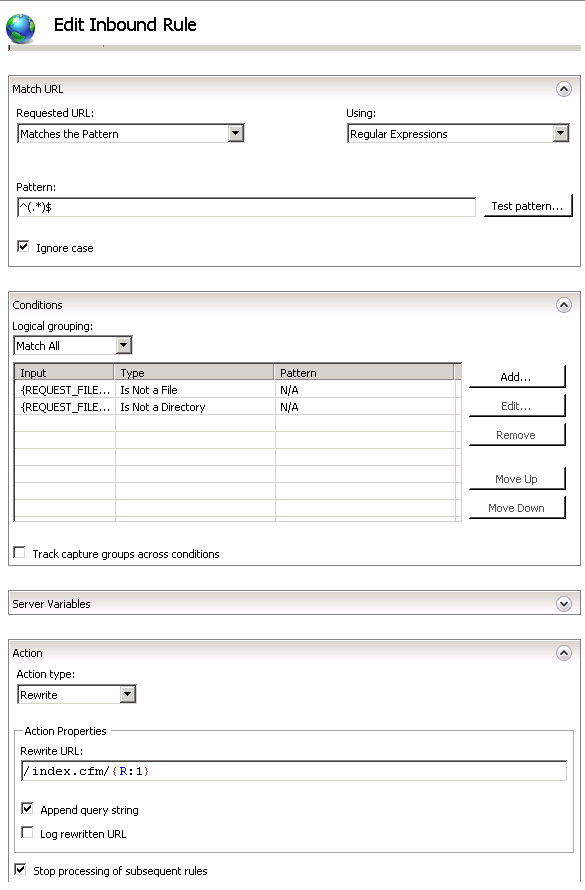
From the URL Rewrite options screen, add a new rule and select “User-friendly URL” under the “Inbound and Outbound Rules”.

The requested URL should match the pattern using regular expressions. The pattern being:

^(.*)$

Add the conditions that the type is not a file or a directory.

The action type is rewrite and the rewrite URL is:

/index.cfm/{R:1}

Be sure to check “Append query string” and “Stop processing of subsequent rules”

Continue reading

#coldfusion-2, #fw1, #iis, #microsoft-web-platform-installer

Default TimeStamp Gotcha with ColdFusion ORM

Let’s say for example you have a simple forum on your site. When ever a new post is added, you want to associate a date/time with the post.

Using SQL and ColdFusion there are three ways to do this:

INSERT INTO
    Forum(body, dateTimeInserted)
VALUES(
    <cfqueryparam value="#form.body#" cfsqltype="cf_sql_longvarchar">,
    <cfqueryparam value="#now()#" cfsqltype="date">
)

OR

INSERT INTO
    Forum(body, dateTimeInserted)
VALUES(
    <cfqueryparam value="#form.body#" cfsqltype="cf_sql_longvarchar">,
    GETDATE()
)

OR

Set your default column value to ‘GETDATE()’ (in MSSQL)

INSERT INTO
    Forum(body)
VALUES(
    <cfqueryparam value="#form.body#" cfsqltype="cf_sql_longvarchar">
)

The third has always been the most recommended method. The reason being less network traffic and the SQL Server is the common denominator between the SQL Server and your application servers.

Now introduce ColdFusion ORM into the mix. The default value method still works when you set the property attribute of “insert” to false in your bean.

component persistent="true" table="Forum" {
    property name="ID" fieldType="id" generator="native";
    property name="body";
    property name="dateTimeInserted" insert="false";
}

However the case where it doesn’t work as needed is when you save the entity and load all the entities within the same ORM Session (ColdFusion request).

So let’s say our controller method looks like this in FW/1:

void function forum( required struct RC ) {
    if( structKeyExists( RC, "body" ) ) {
        getForumService().add( body = RC.body );
    }
    RC.forumEntities = getForumService().get();
}

Because the entity we just saved is still in the same ORM session, it doesn’t look at the database again for it. But because we rely upon SQL to add the timestamp, ORM doesn’t know about it yet. Thus it returns an empty string instead of the date and time it was added.

So we get something like this record set:

1|’Body 1’|’1/25/2014′
2|’Body 2’|’1/26/2014′
3|’Body 3’|”

This is of no use to me. I suppose I could loop through the array and if one has an empty date/time added value, then reload that entity, but that seems like overkill for my application.

So in the end, unless precise date/time stamps are needed, I’m going to use the application server’s date/time (now()) instead of SQL’s GETDATE() default.

void function add( required string body, required date dateTimeInserted ) {
    var forumEntity = entityNew('forum');
    forumEntity.setBody(arguments.body);
    forumEntity.setDateTimeInserted(arguments.dateTimeInserted);
    entitySave(forumEntity);
    ormFlush();
};

#coldfusion-2, #orm

Portrait of an ISFP

My sister had her family take this personality test and found it pretty dead on for results. Intrigued, and with a little push from her, I took this test.

Granted it cost me $5 and it’s a horrible, horrible website… the results where about 90% accurate. I’m not an animal lover (along with being allergic to many of them) and my creation of art is nil (unless coding is considered an art).

I suggest finding out more about yourself at https://www.personalitypage.com/html/indicate.html

Here’s mine: Introverted Sensing Feeling Perceiving

The Artist

As an ISFP, your primary mode of living is focused internally, where you deal with things according to how you feel about them, or how they fit into your value system. Your secondary mode is external, where you take things in via your five sense in a literal, concrete fashion.

ISFPs live in the world of sensation possibilities. They are keenly in tune with the way things look, taste, sound, feel and smell. They have a strong aesthetic appreciation for art, and are likely to be artists in some form, because they are unusually gifted at creating and composing things which will strongly affect the senses. They have a strong set of values, which they strive to consistently meet in their lives. They need to feel as if they’re living their lives in accordance with what they feel is right, and will rebel against anything which conflicts with that goal. They’re likely to choose jobs and careers which allow them the freedom of working towards the realization of their value-oriented personal goals.

ISFPs tend to be quiet and reserved, and difficult to get to know well. They hold back their ideas and opinions except from those who they are closest to. They are likely to be kind, gentle and sensitive in their dealings with others. They are interested in contributing to people’s sense of well-being and happiness, and will put a great deal of effort and energy into tasks which they believe in.

ISFPs have a strong affinity for aesthetics and beauty. They’re likely to be animal lovers, and to have a true appreciation for the beauties of nature. They’re original and independent, and need to have personal space. They value people who take the time to understand the ISFP, and who support the ISFP in pursuing their goals in their own, unique way. People who don’t know them well may see their unique way of life as a sign of carefree lightheartedness, but the ISFP actually takes life very seriously, constantly gathering specific information and shifting it through their value systems, in search for clarification and underlying meaning.

ISFPs are action-oriented individuals. They are “doers”, and are usually uncomfortable with theorizing concepts and ideas, unless they see a practical application. They learn best in a “hands-on” environment, and consequently may become easily bored with the traditional teaching methods, which emphasize abstract thinking. They do not like impersonal analysis, and are uncomfortable with the idea of making decisions based strictly on logic. Their strong value systems demand that decisions are evaluated against their subjective beliefs, rather than against some objective rules or laws.

ISFPs are extremely perceptive and aware of others. They constantly gather specific information about people, and seek to discover what it means. They are usually penetratingly accurate in their perceptions of others.

ISFPs are warm and sympathetic. They genuinely care about people, and are strongly service-oriented in their desire to please. They have an unusually deep well of caring for those who are close to them, and are likely to show their love through actions, rather than words.

ISFPs have no desire to lead or control others, just as they have no desire to be led or controlled by others. They need space and time alone to evaluate the circumstances of their life against their value system, and are likely to respect other people’s needs for the same.

The ISFP is likely to not give them-self enough credit for the things which they do extremely well. Their strong value systems can lead them to be intensely perfectionist, and cause them to judge themselves with unnecessary harshness.

The ISFP has many special gifts for the world, especially in the areas of creating artistic sensation, and selflessly serving others. Life is not likely to be extremely easy for the ISFP, because they take life so seriously, but they have the tools to make their lives and the lives of those close to them richly rewarding experiences.

Jungian functional preference ordering:

Dominant: Introverted Feeling
Auxiliary: Extraverted Sensing
Tertiary: Introverted Intuition
Inferior: Extraverted Thinking

#isfp

FW/1 SES w/ IIS 7.5 URL Rewrite

I am trying to implement REST with ColdFusion FW/1. However I was always getting a 404 error. So I decided that URL Rewriting needed to be setup on the server to handle those type of requests.

I was able to find information on rewrites for Apache, but nothing for the IIS URL Rewrite module.

Here’s what I was able to come up with and it appears to work pretty good. (this is from web.config)

<?xml version="1.0" encoding="UTF-8"?>
<configuration>
    <system.webServer>
        <rewrite>
            <rules>
                <rule name="RewriteUserFriendlyURL1" stopProcessing="true">
                    <match url="^(.*)$" />
                    <conditions>
                        <add input="{REQUEST_FILENAME}" matchType="IsFile" negate="true" />
                        <add input="{REQUEST_FILENAME}" matchType="IsDirectory" negate="true" />
                    </conditions>
                    <action type="Rewrite" url="/index.cfm/{R:1}" />
                </rule>
            </rules>
        </rewrite>
    </system.webServer>
</configuration>

and this is what should be in your Application.cfc:

component extends="org.corfield.framework" {

	variables.framework = {
		generateSES = true,
  		SESOmitIndex = true
	};

}

#coldfusion-2, #fw1, #url-rewriting