Cleaning Up After Crawlers: Managing Bot-Generated Sessions in ColdFusion

For many ColdFusion websites, you never have to think about this. But for ColdFusion websites that maintain sessions, keep a bit of data in the session scope, and have a larger page count, session memory may become something you need to consider.

When a search engine spider, AI bot, or other bot hits your site, they do not maintain cookies. To track user sessions in ColdFusion, cookies are generally required. This means that if a request does not have a CFID, CFTOKEN or JSESSIONID cookie, a new session is created.

Let’s say you have an e-commerce site that has 5,000 products. A search engine spider will crawl through all 5,000 product detail pages, creating 5,000+ sessions within a relatively short period of time. ColdFusion’s default session timeout is 20 minutes, so all these sessions disappear within 20 minutes. But we know that they are never needed again after the first request. So let’s get rid of them right away instead of racking up memory.

Your first question would be, why create a session in the first place if we know they are a bot? The answer to that is you may have code that’s dependent on the session scope. If you don’t create the session, or delete it before the rest of the code runs, your code will then error. You could wrap your variable requests in logic, but who wants to do that?

Below is a very basic Application.cfc file that detects if any cookies are defined for your site on the visitor’s browser. Keep in mind that first-time users to your site will have no cookies until the second request if they have cookies enabled. This code will destroy the session after 1 second if no cookies are found. This could be first-time visitors, bots, or spiders. Once cookies are found, it will increase the session timeout to 20 minutes.

Many people approach this by trying to detect keywords in the user-agent header value. While this works much of the time, it may fail down the road if the bot changes the value to something unexpected or if a bot/spider tried to mimic a browser and not be truthful (or just don’t care) about who they are using the user-agent value.

Important: Some may wonder if this affects everyone globally. This code is request-based and only affects this specific request.

component {
this.name = hash( getCurrentTemplatePath() );
this.sessionManagement = true;
if (!len(cgi.HTTP_COOKIE)) {
/* By default, all of our new sessions will be given a very short timeout. This will be true for all users, spiders, and bots.
We want sessions to always be enabled since our page request might require it. */
this.sessionTimeout = createTimeSpan( 0, 0, 20, 0 );
} else {
this.sessionTimeout = createTimeSpan( 0, 0, 0, 1 );
}
}

Another way of doing this, if for some reason you prefer not to use sessionTimeout, is to use the undocumented setMaxInactiveInterval() method in the session scope. The argument is a long int, so you may need to use JavaCast for your use case, but a simple “1” will do the job for our use case.

component {
this.name = hash( getCurrentTemplatePath() );
this.sessionManagement = true;
this.sessionTimeout = createTimeSpan( 0, 0, 20, 0 );
public boolean function onRequestStart( required string targetPage ) {
// see if cookies are found. Bots usually do not pass cookies which are created by ColdFusion session management.
if (!len(cgi.HTTP_COOKIE)) {
/* Change the timeout on the current session scope to 1 second.
While this invalidates the session for subsequent requests, the memory is not always reclaimed instantly.
It is reclaimed when the underlying server checks for inactive sessions, which may take a moment.
*/
session.setMaxInactiveInterval(1);
}
return true;
}
}

To monitor how you are doing with session counts being created and destroyed, you can use FusionReactor’s Sessions dashboard under the UEM menu. Here, you can track applications and how they are creating, destroying, and rejecting sessions within the last 5 seconds, 1 minute, and 1 hour.
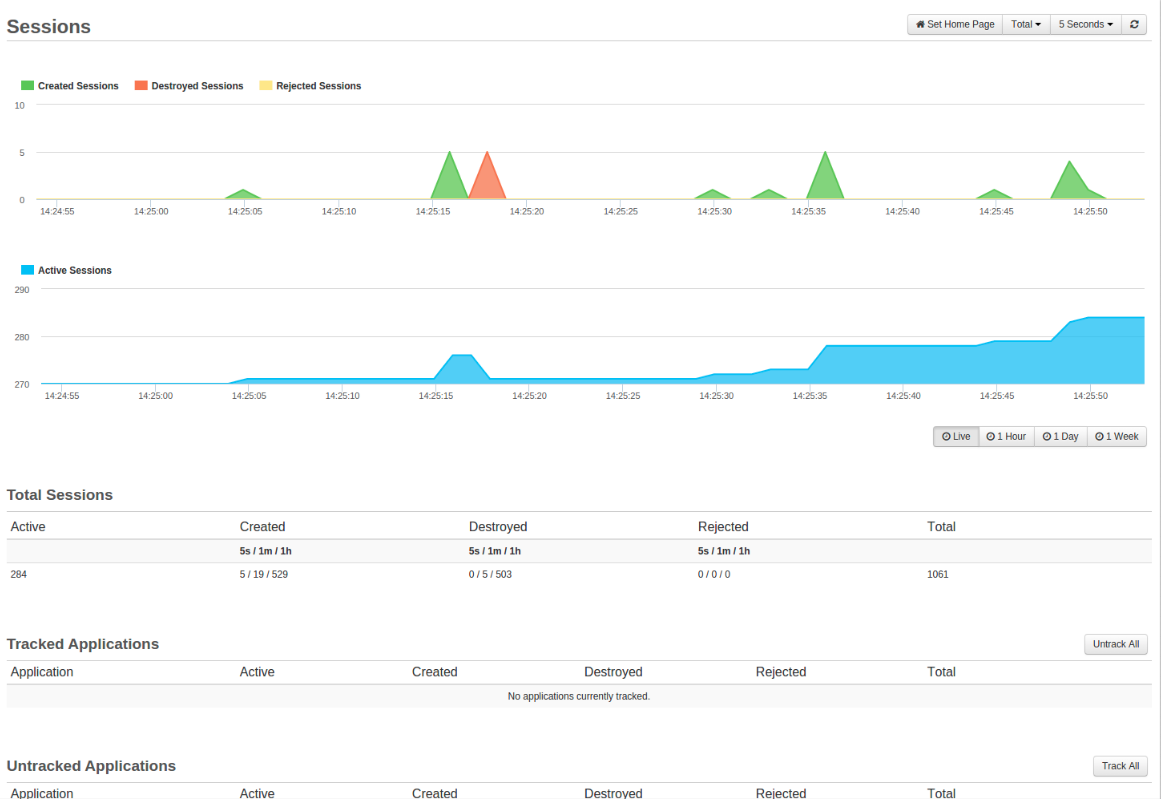
Credit: https://docs.fusionreactor.io/Data-insights/Features/UEM/Sessions/

Check out Charlie Arehart’s article on session tracking in FusionReactor.

#coldfusion-2, #session

ColdFusion Remote File Attack Using Admin API

I recently came across an older ColdFusion 2018, update 12, server that was many patches behind. I can’t go into details on this server’s origin.

We noticed that one of many websites on this single Windows IIS server returned a “Failed to add HTML header” a couple of times. This site still uses FuseBox 3.1. Then the site just started returning empty content, with no error and a valid 200 HTTP code. No errors logged in the ColdFusion logs.

We noticed a .jpg file in the root with a recently modified date that did not belong there, and the robots.txt was recently updated.

The .jpg file contained malicious PHP code, while the robots.txt file had the following appended:

# Sitemap: http://{url}/?sitemap=1&type=index
# AUTH:upload/7FD4B026F124.jpg

I am not positive why it added a sitemap reference.

If you deleted the .jpg file, it recreated it and appended another “AUTH:” line when the site was hit again, due to a cfinclude (in this case it was in the index.cfm).

When looking at FusionReactor, we saw HTTP calls being made to api.cdnapi.tech. Unknown the reason for those, but it’s malicious. Check your code for this.

We did find suspicious calls to “cf_script/clients.cfm” in the IIS log file. It was determined that this file was added to mimic the client variables handler file name. I am not going to publish the code, but it basically wrote a .cfm file from a form field (seemingly from the GET request, while it injected a form field below and likely modified the action property of the form), ran it via a cfinclude, and then deleted the file with some error handling. Pretty simple.

After running IIS logs through Claud.ai, it found that the adminAPI was exploited using a vulnerability that bypassed directory restrictions. Look for “/hax/..” and “/..” in your IIS logs. This exploits CVE-2023-29298.

GET /hax/..CFIDE/adminapi/administrator.cfc?method=getBuildNumber&_cfclient=true
GET /hax/..CFIDE/adminapi/_servermanager/servermanager.cfc?method=getHeartBeat Status: 200
GET /index.cfm?{redacted}/CFIDE/administrator/index.cfm/CFIDE/adminapi/base.cfc User-Agent: python-requests/2.32.4

The first GET queries the API administrator to get the ColdFusion version. The second appears to verify access to admin API using the getHeartBeat() method. The last GET statement is an injection attempt via a form. I have redacted the URL query specific to the site. Both GET statements were successful. We seen some other POST requests to accessmanager.cfc and base.cfc without the directory traversal hack, but were unsuccessful.

These requests were scattered over a period of about a month.

As an immediate solution, we blocked any URI starting with “hax/” and “/..” in our WAF (Web Application Firewall). There should be no reason to access this path other than to exploit the server.

This information is to help other ColdFusion admins narrow down a similar compromised server as a reference. This particular server is getting the needed updates and resolution.

If you need assistance with a compromised server, reach out to me or CF Webtools to help you in a time of crisis.

#admin-api, #coldfusion-2, #cve-2023-29298, #hack, #vulnerability

cfscript cf*() functions are Custom Tags

I found an interesting discussion between the community and Adobe today regarding early cfscript functionality for tags. They use CFCs (query.cfc, ldap.cfc, http.cfc, etc.) located in the ColdFusion installation directory.

I found this interesting as I never put together that the early introduction of cfscript functionality using “cf…()” was a custom tag. See the screenshot below.

These do not correspond with “modern” cfscript such as “httpservice = new http();”. “cfhttp();” is a custom tag, however.

The discussion surrounded Adobe’s position/long-term plan for these CFC’s. If you look at ColdFusion Deprecated Features, these specific functions have been depreciated since the 2018 release. Not that they are NOT marked as “Deprecated and unsupported”. However, in the Adobe bug tracker, any related bug (and there’s a lot) has been marked as “Never fixing”. This realistically means “unsupported” and therefore, bugs, and potentially security risks, continue to be present even in 2023. Adobe has marked this for internal discussion on how to handle future releases.

It is my recommendation that if you use “cf…()” in your cfscripts while using ColdFusion 2018+, you cease using them in any new code, instead using “modern cfscript”. For existing code, getting those swapped typically looks like replacing the function as you touch it through the code lifecycle. However, some more sensitive organizations may wish to swap these out as a project and were unaware of this. To be clear, I am aware of no active security issues that would dictate immediate replacement.

It is good to take a quick peek at ColdFusion Deprecated Features to become familiar with depreciated functions and attributes so we do not continue to build technical debt for ourselves or our customers. A more popular example may be HTMLEditFormat.

Screenshot of Adobe ColdFusion 2021 Installation Directory Containing Custom Tags for CFCs

#cfscript

Be Aware of Mura CMS Security Issues

Mura CMS was a popular open-source content management system (CMS) written in ColdFusion. While initially an open-source project maintained by blueriver.com, it was re-licensed as a closed-source cloud application with the release of Mura CMS v10 in 2020. There are forked open-source projects based on the last open-source release of Mura CMS 7.1, including Masa CMS – which is currently maintained at v7.4.

Mura CMS 7.x and Masa CMS versions v7.4.0-beta and earlier contain an authentication bypass vulnerability allowing an unauthenticated attacker to log in as any site member or system user. There is a conditional logic flaw in the “remember me” code. Simply, some well-formed steps can send arguments.userHash variable with no value, creating a true value when looking to see if arguments.userHash is empty or arguments.userHash equals the user’s hash. This is accomplished by passing an empty userHash cookie value if using Lucee, or passing in a single irrelevant character if Adobe ColdFusion.

For this article, I am only focusing on the open-source version. Mura CMS 10 has a different CVE (2022-47003). The Common Vulnerabilities and Exposures (CVE) database defined this vulnerability:

CVE-2022-47002 – Authentication Bypass Vulnerability in Masa CMS (Base Score: 9.8 CRITICAL)
A vulnerability in the Remember Me function of Masa CMS v7.2, 7.3, and 7.4-beta allows attackers to bypass authentication via a crafted web request.
Fixed Version(s): Masa CMS v7.2.5, Masa CMS v7.3.10, Masa v7.4.0-beta.3 and later

Continue reading

#cms, #masa, #mura

Getting AWS Java SDK 2.0

In the past I’ve always used REST calls to the AWS API from ColdFusion. There are never any complete CFC libraries that work and they’re almost always dated. The reason being that AWS moves so fast, it’d require a full time person or more to keep it up-to-date and complete.

I am moving towards using the AWS Java SDK to call Java methods from ColdFusion. The SDK is kept up-to-date regularly by AWS and is quite complete and proven. The most common SDK in use today is version 1.x. However, late last year they came out with version 2.0.

According to AWS, “it is a major rewrite of the 1.11.x code base. Built with support for Java 8+, 2.x adds several frequently requested features, like nonblocking I/O, improved start-up performance and automatic iteration over paginated responses. In addition, many aspects of the SDK have been updated with a focus on consistency, immutability, and ease of use.”

But as a non-Java developer that uses Java libraries, this hasn’t come without difficulties. Because of its sheer size, AWS requires you to compile the source into a JAR file. You can compile all of it, which took me 1 hour and 3 minutes at a size of 122MiB. However, they recommend only compiling the (components) service that you plan on using.

I initially installed Maven on Windows 10 to compile it. However, as of version 2.3.6 there is a bug which makes the test fail in Windows, and thus the build. An issue was opened to resolve this and as of 1/22/2019 is pending to be merged into the master branch.

Therefore I compiled in Ubuntu for Windows.

Here’s my commands I used to get the environment ready and build the whole SDK using Maven:

sudo su
apt-get update && apt-get upgrade
# Install Maven
apt install maven
# Install Java SDK 8
apt-get install software-properties-common
add-apt-repository ppa:webupd8team/java
apt-get update
apt-get install oracle-java8-installer
# Verify Maven works and it does not throw a JAVA_HOME notice
mvn-version
# Get the AWS SDK source
git clone https://github.com/aws/aws-sdk-java-v2.git
# Check out a tag containing the release you want to use for the build
cd aws-sdk-java-v2
git fetch && git fetch --tags
git checkout 2.x.x
# Build out the SDK
mvn clean install
# compiles to ./bundle/target/aws-sdk-java-bundle-2.x.x.jar

Now, as I mentioned before, it’s recommended to compile only the components (services) you are going to use to reduce the JAR footprint.

The guide for this can be found here: https://docs.aws.amazon.com/sdk-for-java/v2/developer-guide/setup-project-maven.html

However, I found that guide to be fairly unhelpful. Currently I haven’t been able to get it to build successfully (it creates an empty JAR file).

Basically it’s supposed to use a “Bill of Materials” in the “MVN Repository” as your dependency dictionary. Then I believe it’s supposed to download the source files located in the MVN Repository, based upon your dependency definitions.

Here’s my pom.xml file that is used to define all that:

mvn-no-jar

After hours of frustration, I decided to boot up an AWS Linux 2 instance to see if maybe it was Windows Ubuntu related. Interestingly enough I got a different outcome.

When looking at the contents of the target jar, it looks promising. Not exactly sure what to expect just yet.

#jar, #java, #sdk

CF Summit 2017 – Part 2

Starting from Part 1 of my “CF Summit 2017” series I will dive into some of my conversations with Adobe and more “Application Monitoring Suite” details.

The Adobe Team

20171117_101210Let me start out by saying that I know a number of people, myself included, enjoyed having the ColdFusion engineering team on-site at the conference. I want to thank them for the long trip from India which appears to be at least a 24 hour trip one-way. I could barely stand the 3 hour cattle flight from Omaha on Southwest. Those seats were great when I was a kid half my current size – but they never seemed to take into account that American adults actually sit in those seats too!

I spent a bit of time speaking with Anit Kumar, the Technical Support Manager, who was very welcoming of what I had to say. A number of people also wanted his attention, so I also spoke a bit to Vamseekkrishna Nanneboina, the Quality Engineering Manager. Continue reading

CF Summit 2017 – Part 1

My co-worker at CF Webtools, Wil Genovese, and myself were fortunate to attend the Adobe ColdFusion 2017 Summit this year.

The primary focus of the event was on “Aether”, the next version of ColdFusion, which will be known as “ColdFusion 2018”. The primary topic surrounding Aether was the API Manager, Containerization (Docker), security by default and a new “Application Performance Monitoring Suite”.

20171116_101311

Continue reading

Running ColdFusion 9 on Windows 10

CommandBoxLogoMost of us find it impossible to install and run Adobe ColdFusion (ACF) 9 on Windows 10. There are a select few that suspiciously find it easy to install and run on Windows 10.

One of the more popular methods is to create a Windows 7 Virtual Machine (VM) and install Windows 7 there. I’ve even done that. But what you find, particularly on Hyper-V, is that it lacks portability. I can’t reasonably send another developer my VM. #1 due to licensing issues #2 it can be huge depending upon the size you reserved for the virtual drive.

But thanks to the Ortus team, and with a little open mindness, CommandBox takes care of this issue. From the Ortus website: “CommandBox is a standalone, native tool for Windows, Mac, and Linux that will provide you with a Command Line Interface (CLI) for developer productivity, tool interaction, package management, embedded CFML server, application scaffolding, and some sweet ASCII art. It seamlessly integrates to work with any of our *Box products but it is also open for extensibility for any ColdFusion (CFML) project as it is also written in ColdFusion (CFML) using our concepts of CommandBox Commands. It tightly integrates with our contribution community; ForgeBox, so developers can share modules world-wide.”

So basically what’s going on here, in this blog entry’s context, is CommandBox will run ACF 9+, Railo 4.2 and Lucee 4.5+. This is done by running a WAR in Java against CommandBox’s own web server which still supports ACF9 integration. Technically you’re supposed install Java 1.7 for official support of ColdFusion 9. However, from what I’ve seen, it runs just fine on Java 1.8.

Here are the easy steps in Windows to get you running in less than 10 minutes:

  1. Download CommandBox at https://www.ortussolutions.com/products/commandbox#download. I suggest “With JRE Included”.
  2. Extract the contents to something like C:\CommandBox. For all other OS’s see Installation.
  3. Open a Command Prompt
  4. Go to your new directory, such as “CD C:\CommandBox”
  5. Type “box” and enter
  6. This will then initiate Box for the first time and then take you to the Box CLI.
  7. Change the directory to your first website that needs ColdFusion 9, in this example. ex: “cd \websites\cf9test”
  8. Here we will set the ColdFusion engine, version, hostname (optional) and name (optional). Run:
    server set app.cfengine=adobe@9 (this will run the latest version of ACF 9)
    server set web.host=cf9test.local (be sure to set in DNS or your hosts file to 127.0.0.1 or you will get a “Cannot assign requested address: JVM_Bind” error)
    server set name=cf9
    *
  9. Step #8 will be saved in server.json and never needs to be done again as long as that file is intact. For more configuration arguments, see Server.json.
  10. Type “start” and enter**
  11. This will download the ColdFusion 9 WAR and extract it and then initialize it. This may take a number of minutes.
  12. Once CF9 is “installed” a browser window will open up to “http://cf9test.local” or whatever you set the web.host to. If you didn’t define web.host it will open up to “http://127.0.0.1”. Either way it will use a random port number. This port number can be defined in the server.json configuration file.
  13. Append “/CFIDE/Administrator” to the URL it is using. If you accidentally closed the browser tab, look for the blue CF task icon in your task bar. Click it once and click “open browser”.
  14. The password to the ACF admin is “commandbox”
  15. Configure necessary settings such as data sources or enable J2EE session variables if needed.
  16. Then go back to your root URL and you should be up and running.

There is so much you can do with CommandBox, including https, URL rewrite and even generating CFM frameworks. See the CommandBox Manual for more.

*When setting the server name, this will allow you to keep configurations stored such a DSN in the admin. You can use a general name such as “cf9” and use it among different instances or you can use a more specific name just for that instance or a group of instances such as “mysite”. Without it, you have a chance of loosing or overwriting configurations in the CF Admin.

There is a way to script out you ColdFusion config, such as DSN’s, using CFConfig CLI. However as of this post writing, it doesn’t allow you to use ColdFusion 9. But feel free to experiment using this with other versions or later down the road.

There are a number of other ways to configure your servers as well. See Configuring your CommandBox servers on first start by Brad Wood.

**The trick to thinking here is the webroot for the website being loaded up in your browser, is the directory you run “start” in.

ColdFusion Framework Note

I tend to monitor the “ColdFusion Programmers” Facebook group. Today a poster asked:

Hi guys, What do you prefer: CFWheels or Coldbox? I used before CFWheels and is good but I recently starts playing with Coldbox and so far is pretty cool – Jorge Alexandro Martinez Dominguez

My response was:

I use FW/1 for about everything because it’s simple and what I know. However ColdBox will give you a ton more functionality via modules and they aggressively keep that framework up-to-date. They are very involved in the community and even have a “Into The Box” event once a year for pre-conference. I would use either, but if you’re new to both I’d probably look at ColdBox. Both base frameworks are similar.

ColdBoxLogo2015_300Brad Wood, from Ortus Solutions, also chimed in a with a blog post from 2015 about how ColdBox 4 changed pretty drastically. It’s always a good read when asking yourself the Framework question: It’s Time You Looked At ColdBox 4

Simple jQuery AJAX w/ ColdFusion

I had a request to supply a sample HTML page that would send a subscriber’s email address to ColdFusion without reloading the page. So I figured I’d post it here for any others looking for a simple example. This method uses jQuery, AJAX and a ColdFusion component.

index.html or index.cfm

<!DOCTYPE html>
<html>
	<head>
	</head>
	<body>
		<div id="subscribeContainer">
			<input type="email"><button type="button">Subscribe</button>
		</div>
		<script src="//ajax.googleapis.com/ajax/libs/jquery/2.2.2/jquery.min.js"></script>

		<script>
			(function($) {
				// bind the button with an event handler
				$('#subscribeContainer button').click( function(e) {
					// when button is pushed, POST data to remote ColdFusion component method
					$.post(
						'subscription.cfc',
						{
							method: 'subscribe',
							email: $('#subscribeContainer input').val()
						}
						)
						.done( function() {
							// everything worked
							$('#subscribeContainer').text('You have been subscribed.');
						})
						.fail( function() {
							// something failed
							$('
<span>There was an error subscribing.</span>').appendTo('#subscribeContainer');
						}
					);
				});
			})(jQuery);
		</script>
	</body>
</html>

subscription.cfc

component {

	remote void function subscribe( required string email ) {
		// call database insert method here
	}

}