Cleaning Up After Crawlers: Managing Bot-Generated Sessions in ColdFusion

For many ColdFusion websites, you never have to think about this. But for ColdFusion websites that maintain sessions, keep a bit of data in the session scope, and have a larger page count, session memory may become something you need to consider.

When a search engine spider, AI bot, or other bot hits your site, they do not maintain cookies. To track user sessions in ColdFusion, cookies are generally required. This means that if a request does not have a CFID, CFTOKEN or JSESSIONID cookie, a new session is created.

Let’s say you have an e-commerce site that has 5,000 products. A search engine spider will crawl through all 5,000 product detail pages, creating 5,000+ sessions within a relatively short period of time. ColdFusion’s default session timeout is 20 minutes, so all these sessions disappear within 20 minutes. But we know that they are never needed again after the first request. So let’s get rid of them right away instead of racking up memory.

Your first question would be, why create a session in the first place if we know they are a bot? The answer to that is you may have code that’s dependent on the session scope. If you don’t create the session, or delete it before the rest of the code runs, your code will then error. You could wrap your variable requests in logic, but who wants to do that?

Below is a very basic Application.cfc file that detects if any cookies are defined for your site on the visitor’s browser. Keep in mind that first-time users to your site will have no cookies until the second request if they have cookies enabled. This code will destroy the session after 1 second if no cookies are found. This could be first-time visitors, bots, or spiders. Once cookies are found, it will increase the session timeout to 20 minutes.

Many people approach this by trying to detect keywords in the user-agent header value. While this works much of the time, it may fail down the road if the bot changes the value to something unexpected or if a bot/spider tried to mimic a browser and not be truthful (or just don’t care) about who they are using the user-agent value.

Important: Some may wonder if this affects everyone globally. This code is request-based and only affects this specific request.

component {
this.name = hash( getCurrentTemplatePath() );
this.sessionManagement = true;
if (!len(cgi.HTTP_COOKIE)) {
/* By default, all of our new sessions will be given a very short timeout. This will be true for all users, spiders, and bots.
We want sessions to always be enabled since our page request might require it. */
this.sessionTimeout = createTimeSpan( 0, 0, 20, 0 );
} else {
this.sessionTimeout = createTimeSpan( 0, 0, 0, 1 );
}
}

Another way of doing this, if for some reason you prefer not to use sessionTimeout, is to use the undocumented setMaxInactiveInterval() method in the session scope. The argument is a long int, so you may need to use JavaCast for your use case, but a simple “1” will do the job for our use case.

component {
this.name = hash( getCurrentTemplatePath() );
this.sessionManagement = true;
this.sessionTimeout = createTimeSpan( 0, 0, 20, 0 );
public boolean function onRequestStart( required string targetPage ) {
// see if cookies are found. Bots usually do not pass cookies which are created by ColdFusion session management.
if (!len(cgi.HTTP_COOKIE)) {
/* Change the timeout on the current session scope to 1 second.
While this invalidates the session for subsequent requests, the memory is not always reclaimed instantly.
It is reclaimed when the underlying server checks for inactive sessions, which may take a moment.
*/
session.setMaxInactiveInterval(1);
}
return true;
}
}

To monitor how you are doing with session counts being created and destroyed, you can use FusionReactor’s Sessions dashboard under the UEM menu. Here, you can track applications and how they are creating, destroying, and rejecting sessions within the last 5 seconds, 1 minute, and 1 hour.
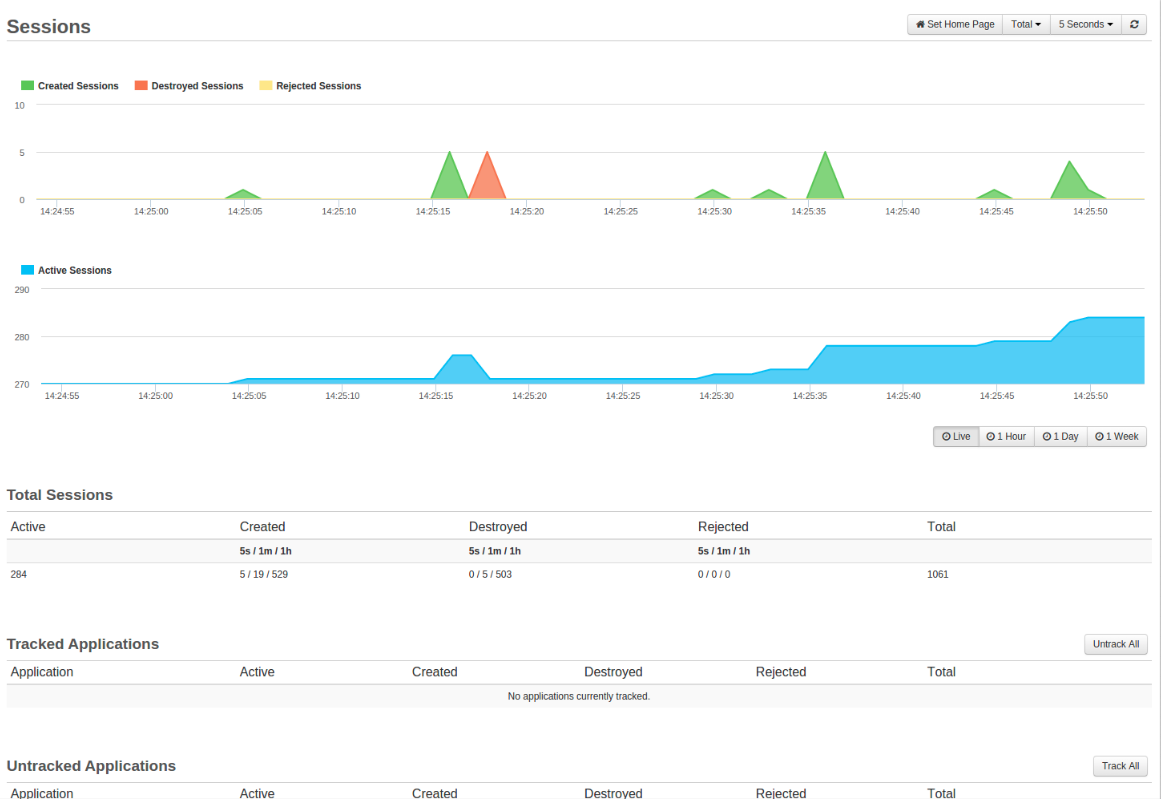
Credit: https://docs.fusionreactor.io/Data-insights/Features/UEM/Sessions/

Check out Charlie Arehart’s article on session tracking in FusionReactor.

#coldfusion-2, #session

ColdFusion Remote File Attack Using Admin API

I recently came across an older ColdFusion 2018, update 12, server that was many patches behind. I can’t go into details on this server’s origin.

We noticed that one of many websites on this single Windows IIS server returned a “Failed to add HTML header” a couple of times. This site still uses FuseBox 3.1. Then the site just started returning empty content, with no error and a valid 200 HTTP code. No errors logged in the ColdFusion logs.

We noticed a .jpg file in the root with a recently modified date that did not belong there, and the robots.txt was recently updated.

The .jpg file contained malicious PHP code, while the robots.txt file had the following appended:

# Sitemap: http://{url}/?sitemap=1&type=index
# AUTH:upload/7FD4B026F124.jpg

I am not positive why it added a sitemap reference.

If you deleted the .jpg file, it recreated it and appended another “AUTH:” line when the site was hit again, due to a cfinclude (in this case it was in the index.cfm).

When looking at FusionReactor, we saw HTTP calls being made to api.cdnapi.tech. Unknown the reason for those, but it’s malicious. Check your code for this.

We did find suspicious calls to “cf_script/clients.cfm” in the IIS log file. It was determined that this file was added to mimic the client variables handler file name. I am not going to publish the code, but it basically wrote a .cfm file from a form field (seemingly from the GET request, while it injected a form field below and likely modified the action property of the form), ran it via a cfinclude, and then deleted the file with some error handling. Pretty simple.

After running IIS logs through Claud.ai, it found that the adminAPI was exploited using a vulnerability that bypassed directory restrictions. Look for “/hax/..” and “/..” in your IIS logs. This exploits CVE-2023-29298.

GET /hax/..CFIDE/adminapi/administrator.cfc?method=getBuildNumber&_cfclient=true
GET /hax/..CFIDE/adminapi/_servermanager/servermanager.cfc?method=getHeartBeat Status: 200
GET /index.cfm?{redacted}/CFIDE/administrator/index.cfm/CFIDE/adminapi/base.cfc User-Agent: python-requests/2.32.4

The first GET queries the API administrator to get the ColdFusion version. The second appears to verify access to admin API using the getHeartBeat() method. The last GET statement is an injection attempt via a form. I have redacted the URL query specific to the site. Both GET statements were successful. We seen some other POST requests to accessmanager.cfc and base.cfc without the directory traversal hack, but were unsuccessful.

These requests were scattered over a period of about a month.

As an immediate solution, we blocked any URI starting with “hax/” and “/..” in our WAF (Web Application Firewall). There should be no reason to access this path other than to exploit the server.

This information is to help other ColdFusion admins narrow down a similar compromised server as a reference. This particular server is getting the needed updates and resolution.

If you need assistance with a compromised server, reach out to me or CF Webtools to help you in a time of crisis.

#admin-api, #coldfusion-2, #cve-2023-29298, #hack, #vulnerability

Purchasing Adobe ColdFusion

Are you in the market or considering purchasing Adobe ColdFusion’s full or upgrade license?

While you always have the option of going straight to Adobe, I recommend purchasing through a reseller. You will typically see a 5% discount and up to 25% depending on the sale.

Do you need help with installation, upgrades, or troubleshooting? Contact me at CF Webtools to hire ColdFusion experts and get where you are going. I will be happy to discuss your situation and give you advice up-front.

Integral

Integral is a great business headquartered in Germany and has regional offices in the UK and the USA. They are the parent company of FusionReactor, and their representative at the ColdFusion conferences is always very helpful and knowledgeable. They have a dedicated ColdFusion software store at:

buy-adobe-software.com

They typically have about a 5% discount and typically offer a 10% discount on their FusionReactor Application Performance Monitor when purchased together as a 1-year subscription.

I highly recommend a FusionReactor Standard Edition at a minimum for tunning and debugging. Especially useful when troubleshooting performance issues or crashes. Their Enterprise and Ultimate editions are even better while logging data to the cloud.

The Adobe ColdFusion release cycle is about once every 2-3 years. If you are about two years into the release cycle, I recommend purchasing the “Platinum Support” option. Not only will this provide you with 1 year of support, but it will provide you a perceived 50% discount on the next upgrade that is “pre-paid”. Meaning you automatically receive the next major version of ColdFusion. Purchasing within 1-2 years can be a gamble depending upon if you expect to use support. This support package is good only for a 1-year term, however the upgrade key remains available even if you do not upgrade within that support subscription period.

Atypical Upgrade Discounts

FusionReactor will also sometime offer a 25% discount on editions that would be normally full price if you are past the previous year’s installation. Typically you can upgrade from the previous edition for about a 50% discount. However, anything older than the previous edition requires a full purchase. A commitment to subscribe to FusionReactor for one year used to be the requirement, but is currently no longer required.

Q1 2023 Discount Link: https://www.fusion-reactor.com/blog/news/coldfusion-hot-sale/ (good until the end of Feb 2023)

Coalesce Solutions

Coalesce Solutions is headquartered in Memphis, TN, and is an alternative to Integral. I met them at the last ColdFusion conference, and they were very helpful. We use their AWS Marketplace solutions as needed for AWS EC2 instances. I do not have first-hand experience with their ColdFusion licensing options, but they do have a store available at:

getcoldfusion.com

Their full and upgrade pricing is similar to Integral’s.

#coldfusion-2

Come Work With My Team!

CF Webtools LogoCF Webtools, where I’ve placed my career coming up on 8 years, is seeking a talented ColdFusion developer. We’re 25 strong and are looking for #26!

You can either work remotely in the comforts of your own personal office space (AKA your spare bedroom) or enjoy your own office space at our Omaha, NE office. We keep in touch with each other day-to-day via Skype. This provides us with one-on-one, project chats and company-wide chats. Most of the time it’s text chatting, but we also use it for voice when it’s just more efficient.

CF Webtools is a great fit for me because it provides the diversity and challenges needed not to become worn out with the same task over-and-over. There are always new opportunities that arise over the years. With this also comes constant learning. Each project brings its own set of challenges.

Granted most projects are not picture perfect as they tend to build up technical debt over time; but you get the opportunity to sell your expertise to the customer giving them the best path forward fitting their needs.

Experience needed not only includes ColdFusion but SQL, SQL, SQL, web server, Windows, Linux, Mobile OS, basic networking and just a good set of troubleshooting skills.

Give Mark or Jason a call at 402-408-3733, tweet @cfwebtools or contact the business owner Mark via his blog at coldfusionmuse.com .

Omaha Staff 2015

Omaha Staff


#career, #cf-webtools, #coldfusion-2, #job, #nebraska, #omaha

Copy tools.jar When Upgrading Java for ColdFusion

javalogo-81x162I happened to read a post on Adobe’s ColdFusion Facebook page, that references a blog post, that references a pretty obscure tip. ColdFusion really needs to implement this somehow in CF Admin like a configurable directory for this file.

I remember knowing this step, but forgot, because it’s documented in obscure places like in the upgrade notes when ColdFusion releases a patch that officially supports a newer version of ColdFusion.

Anyway, ending my rant, when you upgrade to a new major version of Java (and in my opinion every minor version too) be sure to do the following:

  1. Copy tools.jar from {JDK_Home}/lib to {cf_install_home}/{instance}/lib/
  2. Delete all files from {cf_install_home}/{instance}/stubs/ to get the newly compiled classes.

Only JDK contains the tools.jar file not the jre installation. You don’t have to install JDK on the machine where ColdFusion is installed. You can just have jre on this machine and get tools.jar from any other machine’s JDK installation.

#coldfusion-2, #java, #tools-jar, #upgrade

“What is the best IDE for CFM”

I run into the question “What is the best IDE for CFM” here and there. So I thought I’d post my response here as well for others to find:

I personally use ColdFusion Builder and Sublime Text 3 for my projects at CF Webtools.

There is only one IDE for ColdFusion: ColdFusion Builder. An IDE, as opposed to a code editor, has the ability to communicate with a ColdFusion server instance and debug your code. It can also introspect your code, offering code hints based upon what your code is doing.

  • ColdFusion Builder is actively updated. Versions 1 and 2 had massive footprints that really turned me off. I have found that version 3 is much faster and therefore I find much more usable than the previous two. Builder 2016 also came out but you only gain a newer version of a JRE and Security Analyzer which you need CF Enterprise to even run. So I’ve decided not to spend the money for a fairly worthless upgrade at this point.

Everything else is just a code editor (enhanced text editor). A code editor, as opposed to an IDE, does not debug or introspect your code. In order of my recommendation:

  1. The ColdFusion Plugin for Sublime Text doesn’t support CF11 and you can’t install it on version 3 via the package manager. But overall Sublime Text is an excellent code editor. I recommend also installing a jshint package for JavaScript development. It’s a good deal for $70, plus version 3 has been free to try for a long time now while it’s in Beta.
  2. Atom was suggested for me to put on this list. It’s an open source desktop application built with HTML, JavaScript, CSS, and Node.js integration by the folks at GitHub. Adam Tuttle put out a language-cfml package. I’ve never used it but have seen it mentioned a few times on Slack.
  3. ColdFusion Builder Express makes the list as the Express version. Basically use the trial version for 60 days, then it’ll revert to a more basic and free version without the IDE functionality.
  4. CFEclipse might be the most recent with their 1.4.6 release that “only” took 2 years to come up with. But it is free.
  5. cfbrackets for Brackets is still in Beta and hasn’t been updated since June of 2014. It also doesn’t support cfscript which is a huge negative for me. Brackets is open source.
  6. Visual Studio Code was mentioned in the ColdFusion Facebook group. It has a couple of ColdFusion extensions you can install. One is based upon the SublimeText ColdFusion package. I don’t do MS programming, but from what I’ve seen VS seems like a nice piece of software, so hopefully Visual Studio Code lives up to that and becomes a nice option for ColdFusion.
  7. IntelliJ IDEA stopped ColdFusion updates for awhile, but release 15 has support for it again as of November 2015. They don’t list ColdFusion in their what’s new though. I’ve heard some good things about this, but one major downside is the cost ($500 commercial || $200 personal). As of v14 it doesn’t seem to support IDE functions such as debugging but it does have console support. I’ve heard they may have added some actual IDE features since then:Per Nick Kwiatkowski in August of 2016, “it provides limited CFC introspection. It does have the best refactoring, intellisense and Java tools out there (we deploy our copy of Lucee as WAR files). Additionally, it has a ton of tools for working with SQL, CI, and version control — which are lacking or non-existent in other tools.”

    Per James Harvey in August of 2016, “intelliJ has a servers panel that you can.set.up and use services like RDS and yes, debug from. I had my Railo, Lucee and CF servers tied into it.”

Then of course there are outdated code editors such as:

If you’re looking for a true IDE I would stick with ColdFusion Builder for the sole reason is it continues to receive ColdFusion updates. But then again “best” is subjective.

#code, #coldfusion-2, #editor, #ide, #%e6%ad%8c%e6%89%8b%e6%9d%8e%e7%8e%9f%e5%8e%bb%e4%b8%96

ColdFusion 11 Will Not Start After Enabling J2EE Session Variables

Update 1/20/2015: Fix is available in the refreshed Full installers. More information on this is available here at:
http://blogs.coldfusion.com/post.cfm/coldfusion-11-installers-refreshed-has-fix-for-server-fails-to-start-on-enabling-j2ee-session-variables-and-installation-on-japanese-os

After some wicked process of elimination at CF Webtools I found out that I was unable to start/restart ColdFusion 11 after enabling J2EE Session Variables in the ColdFusion Administrator.

I went through almost all types of installs thinking it was an issue with the Amazon EC2 server it was on. Thinking this because we have CF11 servers running with J2EE enabled already.

The difference, and the the issue it turns out, is the updated installer that includes update 3 for Windows x64. The original installer doesn’t seem to have this issue.

The underlying issue is whether or not Tomcat persistent sessions were turned on or off. This apparently keeps a session alive during a restart. ColdFusion apparently doesn’t like this if it’s on.

To turn off Tomcat persistent sessions (this seems a little backwards though):

  1. Open {cf instance}/runtime/conf/context.xml
  2. Uncomment <Manager pathname=”” />
  3. Save file and close
  4. Start ColdFusion

This seems to have been an issue on ColdFusion 10 that somehow made its way back to 11.

Thanks to Derrick Anderson with BigTeams for finding this old issue at we3geeks.

I have opened bug ticket 3923565 with Adobe.

#coldfusion-2, #j2ee, #session-variables, #tomcat

ColdFusion Builder 3 Fuzzy Features

Between ColdFusion Builder 2 and 3, I used Sublime Text editor for about a year. One of the best features that Sublime Text had was fuzzy searches.

For example, on code assist, for a cfqueryparam attribute, I could type “var” and get type=”cf_sql_varchar”. In ColdFusion Builder, you’d have to type “cf_sql_v” to get the same. May not seem like much, but when your brain is focusing on the differences, why should I have to type “cf_sql_” when everyone has that?

Another example would be when using the “Goto Anything” feature, I regularly knew approximately what file name I was looking for, but maybe not exact. So if I type “page”, I may get 30 results. Then I continue to type to get “pagedsp” and find my file “pagedisplay.cfm”. Very handy and quick.

In ColdFusion Builder 3, everything relies upon starting from the beginning of line and pretty exact. It’s very rigid. The file content searches also always take a bit of time.

2014-05-23_1654


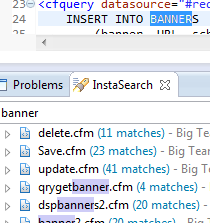
The alleviate the file search issue, I installed the InstaSeach plugin : http://marketplace.eclipse.org/content/instasearch

This plugin instantly returns fuzzy results if your keyword matches text inside the current open file, a file name or content inside a file — INSTANTLY —

Highly recommend to replace your Search > File and Search > Search


To alleviate the code assist issue:

Go to Preferences->ColdFusion->Profiles->Editor->Code Assist and select option ‘Filter Proposals Containing Text’

Thanks to Ramchandra Kulkarni for this tip.

Now I can just type “v”, arrow down once to pass up “cf_sql_longvarchar” and hit enter.


It’s the little things in life.

#coldfusion-2

IIS URL Rewrite Config for FW/1 SES

SES_Screen_ShotAfter a bit of research, I was never able to find a definitive answer as how to properly set up SES (Search Engine Safe URL’s) to work with FW/1 (Framework 1) using IIS 7.5 and IIS URL Rewrite 2.0.

SES makes turns your URL’s from this:

http://www.mysite.com/index.cfm?action=main.default&ID=0

Into this:

http://www.mysite.com/main/default/ID/0

First of all you may need to install URL Rewrite 2.0 using Microsoft Web Platform Installer. There are other options out there, but I’m using this since it’s simple and nicely integrated.

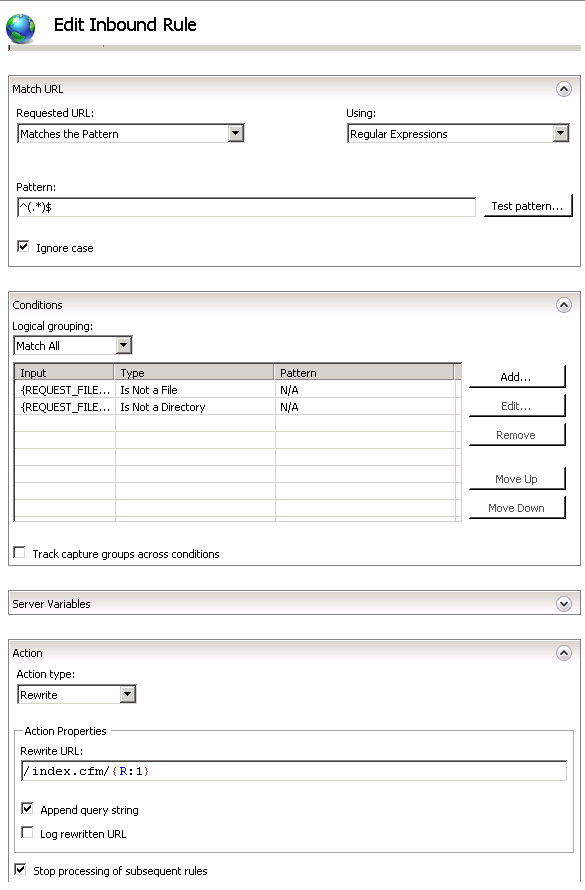
From the URL Rewrite options screen, add a new rule and select “User-friendly URL” under the “Inbound and Outbound Rules”.

The requested URL should match the pattern using regular expressions. The pattern being:

^(.*)$

Add the conditions that the type is not a file or a directory.

The action type is rewrite and the rewrite URL is:

/index.cfm/{R:1}

Be sure to check “Append query string” and “Stop processing of subsequent rules”

Continue reading

#coldfusion-2, #fw1, #iis, #microsoft-web-platform-installer

Default TimeStamp Gotcha with ColdFusion ORM

Let’s say for example you have a simple forum on your site. When ever a new post is added, you want to associate a date/time with the post.

Using SQL and ColdFusion there are three ways to do this:

INSERT INTO
    Forum(body, dateTimeInserted)
VALUES(
    <cfqueryparam value="#form.body#" cfsqltype="cf_sql_longvarchar">,
    <cfqueryparam value="#now()#" cfsqltype="date">
)

OR

INSERT INTO
    Forum(body, dateTimeInserted)
VALUES(
    <cfqueryparam value="#form.body#" cfsqltype="cf_sql_longvarchar">,
    GETDATE()
)

OR

Set your default column value to ‘GETDATE()’ (in MSSQL)

INSERT INTO
    Forum(body)
VALUES(
    <cfqueryparam value="#form.body#" cfsqltype="cf_sql_longvarchar">
)

The third has always been the most recommended method. The reason being less network traffic and the SQL Server is the common denominator between the SQL Server and your application servers.

Now introduce ColdFusion ORM into the mix. The default value method still works when you set the property attribute of “insert” to false in your bean.

component persistent="true" table="Forum" {
    property name="ID" fieldType="id" generator="native";
    property name="body";
    property name="dateTimeInserted" insert="false";
}

However the case where it doesn’t work as needed is when you save the entity and load all the entities within the same ORM Session (ColdFusion request).

So let’s say our controller method looks like this in FW/1:

void function forum( required struct RC ) {
    if( structKeyExists( RC, "body" ) ) {
        getForumService().add( body = RC.body );
    }
    RC.forumEntities = getForumService().get();
}

Because the entity we just saved is still in the same ORM session, it doesn’t look at the database again for it. But because we rely upon SQL to add the timestamp, ORM doesn’t know about it yet. Thus it returns an empty string instead of the date and time it was added.

So we get something like this record set:

1|’Body 1’|’1/25/2014′
2|’Body 2’|’1/26/2014′
3|’Body 3’|”

This is of no use to me. I suppose I could loop through the array and if one has an empty date/time added value, then reload that entity, but that seems like overkill for my application.

So in the end, unless precise date/time stamps are needed, I’m going to use the application server’s date/time (now()) instead of SQL’s GETDATE() default.

void function add( required string body, required date dateTimeInserted ) {
    var forumEntity = entityNew('forum');
    forumEntity.setBody(arguments.body);
    forumEntity.setDateTimeInserted(arguments.dateTimeInserted);
    entitySave(forumEntity);
    ormFlush();
};

#coldfusion-2, #orm