

There are a number of methods for removing emails from the Amazon Simple Email Service (SES) Account Level Suppression List. But underneath they all use the API. This could be via a native API library, importing a file in the console UI, using the CloudShell, and more. But one thing is for certain, the Console UI does not make the practical. You must use the CLI/API in one way or another.
For purposes of this article, we will use the CloudShell. I write this because after asking Amazon Q and doing some Google searches, they all failed. I ended up with a good answer from the handy Stack Overflow post Remove Email from AWS SES Suppression List by user “Jawad“, even though it wasn’t marked as the accepted response.
Just a forewarning, there’s nothing fast about this. It iterates about one email per second, so expect to be monitoring this for a while.
The CloudShell can be access by pressing the “CloudShell” icon in the top header of the AWS console. It looks like a command prompt inside of a window icon. It will default to the region you have currently selected.
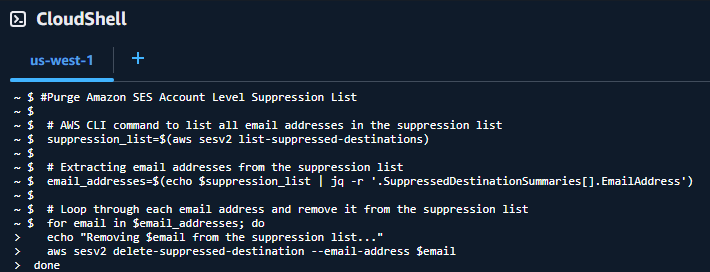
 #Purge Amazon SES Account Level Suppression List

 # AWS CLI command to list all email addresses in the suppression list
 suppression_list=$(aws sesv2 list-suppressed-destinations)

 # Extracting email addresses from the suppression list
 email_addresses=$(echo $suppression_list | jq -r '.SuppressedDestinationSummaries[].EmailAddress')

 # Loop through each email address and remove it from the suppression list
 for email in $email_addresses; do
   echo "Removing $email from the suppression list..."
   aws sesv2 delete-suppressed-destination --email-address $email
 done

 echo "This page of emails purged. Rerun this script to delete further potential pages of emails, if emails were deleted."
Once you run this script, if emails were listed as deleted, run it again. Additionally, changes may take up to 48 hours to propagate. You may find the email still has the status that it is on the suppression list until it propagates.
The command list-suppressed-destinations retrieves the first page of up to 1,000 objects (default), which includes the email. At the end of the returned suppression_list value, if a “NextToken” string is defined, there are more emails still in the list. You can add a --no-paginate parameter to the command to turn off pagination, but depending on the size of your list, it’s possible you may run into unexpected issues, like memory limitations, that I have not tested for. See command documentation.
You can adapt this script to a CLI outside of the CloudShell by adding in --region <your-region> property to the list-suppressed-destinations and delete-suppressed-destination commands.
The other methods that were introduced that I found seem to have failed mostly because they introduced/kept double quotes around the email address, leading to the following error during the delete-suppressed-destination command:
An error occurred (NotFoundException) when calling the DeleteSuppressedDestination operation: Email address (email address) does not exist on your suppression list.
 Chris Tierney