img Element error Event

If you develop and push to production, you most likely have experienced broken images on your dev instance. You may have also run into broken images on production due to user/admin error, etc. Wouldn’t it be nice if you could display a default placeholder image without having to take a hit on your file system, checking to see if it exists, before your load each image?

Thanks to Ryan Stille’s recent blog post, I have been made aware of a (not so great) solution. Apparently the img tag, along with others such as object, script and style have error events. We can listen for the error event and load a placeholder image in place of the default browser error image.

The catch is the event handler must be attached before the browser fires the error event. Also, the error event may not be correctly fired when the page is served locally. The error event relies on HTTP status codes and will generally not be triggered if the URL uses the “file:” protocol.

In simpler terms, the only solution I’ve found is to either place the event handler inline with the img tag, assign the img src via JavaScript or recursively search each image’s complete state or naturalWidth once the window is done loading. I’ve tried using “$().on()” and “$(“img”).error()” both after the document loads and inline before the element is loaded. However neither solution works, which doesn’t make much sense to me.

I am including multiple examples because this is not a one-solution-fits-all scenario.

The first working example displays a placeholder image using the inline method if the error event is thrown. Notice the onerror handler is reset when it’s run so you don’t run into an infinite loop if your placeholder image also fails.

<img src="images/myImage.jpg" alt="My Image" onerror="imageError(this)">

<script>
function imageError(element) {
    element.onerror='';
    element.src='/images/imgPlaceholder.png';
}
</script>

The second working example, also using the inline method, will call a script that will report the broken image and load the placeholder. The script returns an image with the proper image MIME type.

<img src="images/myImage.jpg" alt="My Image" onerror="imageError(this)">

<script>
function imageError(element) {
    element.onerror='';
    element.src='logBrokenImage.cfm?image=' + element.src';
}
</script>

The third working example uses JavaScript to load the image and displays a placeholder if that image fails to load.

<img id="myImage">

<script>
    $('img').one( 'error', function() {
        $(this).attr( 'src', '/images/imgPlaceholder.png' );
    });

    $('#myImage').attr( 'src', 'myImage.jpg' );
</script>

The final working example recursively searches through each image after the window loads. If it finds the state incomplete or the natural width of the image is 0, then it loads the placeholder image.

<img src="images/myImage.jpg" alt="My Image">

<script>
$(window).load(function() {
    $('img').each(function() {
        if ( !this.complete || ( !$.browser.msie && ( typeof this.naturalWidth == "undefined" || this.naturalWidth == 0 ) ) ) {
            this.src = '/images/imgPlaceholder.png';
        }
    });
});
</script>
#error, #event, #handler, #img, #javascript, #jquery, #src

jQuery UI Dialog Centering Issue

I’m working with some code that’s been worked over many, many times over the years. It could a thorough scrubbing, but that’s not in the scope of my request.

I just upgraded the jQuery UI to version 1.9.2 and jQuery to 1.8.3 and added a simple dialog.

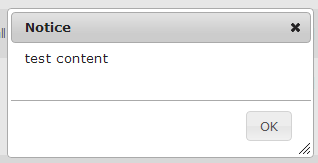
test_dialogIt was expected that the dialog would center itself to the browser window. However it appeared to be centering itself to the html element and scrolling the page to make it centered if the content was longer than the window height.

Here’s the code:

<html>
<head>
    <title>My Title</title>
</head>
<body>
    <div id="userNoticeDialog" style="display: none;" title="Notice">
        test content
    </div>

    <script type="text/javascript">
        $("#userNoticeDialog").dialog();
    </script>
</body>
</html>

After a process of elimination and seeing that there was no doctype declared, I tried adding a doctype. That resolved the issue.

<!DOCTYPE html>
<html>
<head>
    <title>My Title</title>
</head>
<body>
    <div id="userNoticeDialog" style="display: none;" title="Notice">
        test content
    </div>

    <script type="text/javascript">
        $("#userNoticeDialog").dialog();
    </script>
</body>
</html>

I believe the reason was the lack of a DOCTYPE caused the (Chrome) browser to go into quirks mode, while the inclusion of the DOCTYPE caused the (Chrome) browser to go into standards mode. However, I’m not sure how to detect which mode the Chrome browser is currently in. Does anyone know?

#center, #dialog, #doctype, #html, #jquery, #ui

CKEditor 4 Required Field Validation

I’ve used FCK Editor for years, but now with the FireFox 17+ incompatibility it’s time to upgrade to CKEditor.

I ran into some “stupid challenges” along the way. For example I tired out my brain trying to get it to work with jQuery. It appears in CKEditor v3.x there was a jQuery adapter. But in version 4 it wasn’t included. I tried to reuse it, but that seems to fail horribly for me. So I finally gave up on that concept. If anyone has a good way to implement jQuery with CKEditor I’d love to hear from you!

To get things rolling a just call the ckeditor.js file and add the class “ckeditor” to my textarea.

<form>
    <textarea class="ckeditor" id="noticeMessage" name="message"></textarea>
</form>
<script type="text/javascript" src="ckeditor/ckeditor.js"></script>

Now I want to verify that there’s actual text entered. To do that I remove all HTML markup and return the length of the string returned from the CKEditor API. The “noticeMessage” for the “instances” variable is the ID of the “textarea” element.

<form>
    <textarea class="ckeditor" id="noticeMessage" name="message"></textarea>
</form>
<script type="text/javascript" src="ckeditor/ckeditor.js"></script>
<script type="text/javascript">
    $("form").submit( function() {
        var messageLength = CKEDITOR.instances['noticeMessage'].getData().replace(/<[^>]*>/gi, '').length;
        if( !messageLength ) {
            alert( 'Please enter a message' );
        }
    }
</script>

Now if we test this with the word “test” it returns 5 characters. Well that’s not good, because last I knew math “test” only contains 4 characters. If we remove “test”, the correct value of 0 is returned. In this case it really doesn’t matter much because I’m just looking to see if anything is there. But it was annoying me and could prove bad in the future for further tests if I forgot about the issue.

The reason for this is if you view the source it inserts a line return automatically during editing. Normally I can fix this quite easily with jQuery, but because that concept made my head explode, I had to find a different way.

The trim() method didn’t come along in JavaScript until version 1.8.1. So while my current browser users are okay, my older browsers users such as IE8 aren’t so lucky.

To resolve this issue, I test for the “trim()” prototype method. If it doesn’t exist I extend the String prototype object with a trim() method. So thanks to some guy with the alias “Timo” I’ve put this thinking into place. The length result of string “test” now returns an accurate value of 4.

<form>
    <textarea class="ckeditor" id="noticeMessage" name="message"></textarea>
</form>
<script type="text/javascript" src="ckeditor/ckeditor.js"></script>
<script type="text/javascript">
    /**
     * Compatibility fix for trim()
     * Browsers 3.5+, Safari 5+, IE9+, Chome 5+ and Opera 10.5+ support trim() natively
     * So we're detecting it before we override it
     * This is here because CK Editor isn't playing nice with jQuery
     * Thanks to http://blog.stevenlevithan.com/archives/faster-trim-javascript
     */
    if(!String.prototype.trim) {  
        String.prototype.trim = function () {  
            var c;
                 for (var i = 0; i < this.length; i++) {
                     c = this.charCodeAt(i);
                     if (c == 32 || c == 10 || c == 13 || c == 9 || c == 12) continue; else break;
                 }
                 for (var j = this.length - 1; j >= i; j--) {
                     c = this.charCodeAt(j);
                     if (c == 32 || c == 10 || c == 13 || c == 9 || c == 12) continue; else break;
                 }
                 return this.substring(i, j + 1);
        };  
    }

    $("form").submit( function() {
        var messageLength = CKEDITOR.instances['noticeMessage'].getData().replace(/<[^>]*>/gi, '').trim().length;
        if( !messageLength ) {
            alert( 'Please enter a message' );
        }
    }
</script>

#ckeditor, #javascript, #validation

Getting the MS SQL Identity ID With a Complex UPDATE / INSERT Statement

As I posted in my blog entry MSSQL Update/Insert Based Upon Existing Record, it is better to use “IF @@ROWCOUNT=0” rather than “IF EXISTS ()” when updating or inserting a record based upon existence. This is because the preferred method only does a table/index scan once, while the later will do it twice.

What if you need the Identity Column ID whether the record is updated or inserted? Normally in ColdFusion you can use “queryResult[“GENERATEDKEY”]”, however what you will find is this variable only works on simple insert statements. If you try to use @@IDENTITY or SCOPE_IDENTITY, you will find it only returns the Identity Column ID when the insert is triggered.

Introducing MS SQL’s OUTPUT clause, introduced in MS SQL 2005. We can use the OUTPUT clause to return the Identity Column ID(s).

When we add this to the INSERT and UPDATE clauses, the problem we run into is that during an insert it will return an empty set and another set containing the Identity Column ID that was inserted. Therefore we use a temporary table to help us with this.

Now with a temporary table, we introduce back in the second table scan. However this table scan will have very limited rows, if not just one. Plus the temporary table will not need disk access. So the second table scan is of no consequence.

So with all this in mind here’s an example that returns the Identity column that was either inserted or updated. Keep in mind that multiple IDs will be returned as separate rows if more than one table row was updated.

<cfquery name="local.qSetCart">			
	DECLARE @T TABLE (
	    cartID INT NOT NULL
	)
	
	UPDATE
		UserCart
	SET
		dateModified = GETDATE(),
		isGift = <cfqueryparam value="#arguments.isGift#" cfsqltype="cf_sql_bit">
	OUTPUT
		INSERTED.cartID INTO @T
	WHERE
		userID = <cfqueryparam value="#arguments.userID#" cfsqltype="cf_sql_integer">
	
	IF @@ROWCOUNT = 0
	
		INSERT
			INTO UserCart ( userID, isGift)
		OUTPUT
			INSERTED.cartID INTO @T
		VALUES (
			<cfqueryparam value="#arguments.userID#" cfsqltype="cf_sql_integer">,
			<cfqueryparam value="#arguments.isGift#" cfsqltype="cf_sql_bit">
		)
	
	SELECT cartID FROM @T
</cfquery>
		
<cfreturn local.qSetCart.cartID>

#coldfusion-2, #identity, #sql

Google Chrome 23 Developer Tools Now Sports Pixel Rulers

Chrome Pixel Rulers

Quite by accident, after upgrading to Chrome 23 today, I found that there are now pixel rulers shown by default when inspecting an element.

Apparently this comes from a WebKit update which introduces rulers to Web Inspector. When you open the Elements panel and hover over elements or when you use the magnifying glass they show up.

According to Masataka Yakura, the guy who brought this into Chrome, he found out that people didn’t quite like this. In Chrome 25 you can disable the rulers via the preferences panel. But personally I like them!

#chrome, #google, #pixel, #ruler, #web-inspector

Develop For The Future

Let’s say we start a specialized e-commerce site that sells fishing lures that are dropped shipped from Henry’s, a supplier. We found a good deal with Henry’s and we’re so excited to start generating revenue and quite our day jobs a pencil pushers. To get this site up and running we create some database tables:

  • HenrysProducts
    • SKU
    • Brand
    • Model
    • Price
  • Orders
    • OrderID
    • Name
    • Address
    • ShippingPrice
    • Tax
    • OrderTotal
    • TrackingNumber
    • ShippingCarrier
    • DateShipped
  • OrderItems
    • OrderID
    • SKU
    • Quantity
    • Price

You slap up a few files:

  • index.cfm
  • products.cfm
  • cart.cfm
  • shippingInfo.cfm
  • paymentInfo.cfm
  • orderConfirmation.cfm
  • contactUs.cfm

Put in some images and “bam” you’re rolling. The lures you’re selling are “hot stuff” and you start bringing in revenue. Yea!

Oh! What’s this? An order for $500 worth of lures? Yes!

The order goes through, but Henry’s says “Sorry, we don’t have 100 of the 500 lures you ordered. We’ll place those on back-order for you.”. You think, “Okay, no problem.”. But wait! How are we going to handle that? Time for a new table and some logic to handle emails when things are backordered, cancelled and shipped:

  • HenrysOrderFulfilment
    • OrderID
    • SKU
    • QuantityShipped
    • QuantityBackOrdered
    • QuantityCancelled
    • ShipmentID
  • HenrysShipments
    • ShipmentID
    • TrackingNumber
    • DateShipped
    • Carrier

Now that we’ve started getting popular, people really want some items that are only available from the manufacturer. But now we have everything setup for Henry’s, not thinking ahead for the future. So we have a few options:

  1. Keep using what we have and append a column to tell us where it’s really coming from
  2. Create new tables for the new manufacturer
  3. Refactor the tables to be more generic

And of course, we should opt for #3. This should have been where we started in the first place. You should never assume your business model will never change, your contract might never expire from your supplier or that your business will never grow. Because with that kind of thinking, it becomes much more costly to grow your business having to deal with the side affects of your starting decisions. That growing time also usually involves lack of time because you become so busy with the messy system. Here’s an example of how it should have been built in the first place.

  • Products
    • ProductID
    • Brand
    • Title
  • ProductChildren
    • ProductChildID
    • ProductID
    • ModelTitle
    • SKU
    • UPC
    • Price
    • Weight
  • ProductSupplierLookup
    • ProductChildID
    • SupplierID
    • Cost
    • Priority
  • Suppliers
    • SupplierID
    • Name
  • Orders
    • OrderID
    • Name
    • Address
    • ShippingPrice
    • Tax
    • OrderTotal
    • TrackingNumber
    • ShippingCarrier
    • DateShipped
  • OrderItems
    • OrderItemID
    • OrderID
    • SKU
    • Quantity
    • Price
  • OrderFulfilment
    • OrderItemID
    • SupplierID
    • ItemCost
    • QuantityOrdered
    • QuantityShipped
    • QuantityBackOrdered
    • QuantityCancelled
    • ShipmentID
  • Shipments
    • ShipmentID
    • TrackingNumber
    • DateShipped
    • Carrier
    • Method

With this type of structure you can add multiple supplier, order from multiple suppliers for each customer order using a priority number, handle back-orders and cancellations, use the most cost efficient supplier, change, add and remove suppliers and keep track of multiple packages shipped.

Of course this is a fairly basic structure, but it’s a good way of thinking forward whether you’re starting from scratch or enhancing your system.

That touches the SQL aspect of it. However if you re-factored your code using the above file structure, I’m betting you’re code is complex and messy. You may have even coded it a year ago and forgot where everything was. You may even have a different developer or developers working on the enhancement.

This is why you should always split out your view code into .CSS, .JS and template files to generate HTML. You should also be using CFC’s, if using ColdFusion, and a FrameWork is a must. You now have a much more manageable file structure that you can manipulate your code with much more ease. Also don’t forget your unit testing so you reduce your chances of accidentally breaking something. I suggest using something like FW/1 as it’s lightweight and easy, one you get the hang of it.

Hacking ColdFusion 9 Application Scopes

You can find many hidden jems in the coldfusion.runtime.ApplicationScopeTracker Java class.

appTracker = createObject( 'java', 'coldfusion.runtime.ApplicationScopeTracker' );
writeDump( var = appTracker );

List all application scope names:

applications = appTracker.getApplicationKeys();
while( applications.hasNext() ) {
writeOutput( applications.next() & '<br>' );
}

Dump a specific application scope:

appScope = appTracker.getApplicationScope( 'myAppName');
writeDump( appScope );

“Element GENERATEDKEY is undefined…” after ColdFusion SQL Statement

This is a followup post to “Returning IDENTITY ID via ColdFusion 9′s CFQuery“.

Today I created an Insert statement that I needed the new identity value returned. It’s pretty simple, calling the result.generatedkey as such:

<cfquery result="myResult">
    INSERT INTO users( username )
    VALUES( 'test' )
</cfquery>
<cfreturn myResult["GENERATEDKEY"]>

The above code would normally result in the new identity value created for that record. However I received a “GENERATEDKEY is undefined…” error. Not sure what to think I dumped out the myResult variable, put the query into a file of itself and even tried using myResult.IDENTITY instead to no avail. After taking awhile figuring this out and ended up going home for the day and trying there again after a couple of hours. All of a sudden the standalone test worked!

So I’m thinking, okay this has to be some setting somewhere, and I was right. I narrowed it down to a query that runs before it during the login process for my website.

SET NOCOUNT ON

UPDATE TABLE1
SET COL1 = 'myVal'

Notice that I didn’t set “SET NOCOUNT OFF”. There lies the issue. Apparently when you set NOCOUNT off and keep it off, ColdFusion doesn’t retrieve the new Identity value. So the following code fixed my issue:

SET NOCOUNT ON

UPDATE TABLE1
SET COL1 = 'myVal'

SET NOCOUNT OFF

#cfquery, #coldfusion-2, #generatedkey, #identity, #nocount, #sql

ColdFusion CFQuery Zero Records and the “Element x is undefined in x” Error

When you run a CFQuery tag in ColdFusion you “will always” get a query object returned whether or not any results where found. But recently, after running a complicated query in ColdFusion 9.0.1, I found this to not be true. When there where results, everything worked as expected. However, when there where no results then I received a “Element x is undefined in x.” error when calling the CFQuery’s name variable. Here’s a simplified example of my code:

<cfquery name="local.products">
SELECT P.product
FROM Products P
JOIN (
    SELECT PC.productID, MIN( PC.price ) )
    FROM ProductsChildren PC
    GROUP BY PC.productID
) price ON P.productID = price.productID
</cfquery>
<cfdump var="local.products">

After banging my head and doing some research I ran through this thread that helped me resolve the issue: http://forums.adobe.com/message/2595679 . They mention a couple of bug ID’s, but Adobe updated their bug-base and I can’t find them. So at some point I’ll create a new ticket for this issue.

The problem lies in the fact that my SQL was generating a warning message inside the joined sub-query and CF wasn’t handling that very well. One fix is to fix why this message is being generated in the first place by adding a ISNULL() or COALESCE() around the column the MIN() method is reading. For example:

<cfquery name="local.products">
SELECT P.product
FROM Products P
JOIN (
    SELECT PC.productID, MIN( COALESCE( PC.price, 0 ) ) )
    FROM ProductsChildren PC
    GROUP BY PC.productID
) price ON P.productID = price.productID
</cfquery>
<cfdump var="local.products">

The second method would be to add “SET ANSI_WARNINGS OFF;” to the beginning of the SQL statement. For example:

<cfquery name="local.products">
SET ANSI_WARNINGS OFF;

SELECT P.product
FROM Products P
JOIN (
    SELECT PC.productID, MIN( PC.price, 0 ) )
    FROM ProductsChildren PC
    GROUP BY PC.productID
) price ON P.productID = price.productID
</cfquery>
<cfdump var="local.products">

The first fix is probably the best method to choose, however both of these resolved my issue.

There are other workarounds such as using the JDBC driver, but this approach seems to be the most practical.

#coldfusion-2, #join, #query, #sql, #sub-query, #undefined

Handling Expired Sessions via AJAX & FW/1

This is a followup to my “Framework One AJAX Method (FW/1)” post (https://christierney.com/2012/07/14/framework-one-ajax-method-fw1/).

Scenario:

  1. You use the session scope to define if a user is logged in or not
  2. You use jQuery AJAX to pull JSON data from FW/1 action URL’s
  3. The user’s session has expired after x minutes of inactivity after login
  4. If the session is expired the user is directed to a login page after trying to navigate

So what happens in this scenario? Instead of the expected JSON data your AJAX call receives the HTML of a login page with a status of 200. Can’t do too much with this.

Here’s a code example that will pass the client a 403 error (Forbidden) in the header and return no content. jQuery will then redirect the user to a login screen when it sees this status code.

First here’s a simlified FW/1 Application.cfc setupRequest() method:

void function setupRequest() {

	var reqData = getHTTPRequestData();

	if( structKeyExists( reqData.headers, 'X-Requested-With' ) && reqData.headers[ 'X-Requested-With' ] == 'XMLHttpRequest' && !structKeyExists( session, 'user' ) ) {
		getpagecontext().getresponse().setstatus( 403 );
		abort;
	}
}

This code detects if the call came from an AJAX request ( getHTTPRequestData().headers.X-Requested-With = ‘XMLHttpRequest’ ) and if the session still knows about the user. If it is an AJAX request and the user is not known, then set the status code of the return page to 403 and stop processing any more code. If you try to use throw instead of abort, it will overwrite the status code to 500.

The second simple example is the jQuery piece:

$( document ).ready( function() {

	$( this ).ajaxError( function( e, jqXHR, settings, exception ) {
		if( jqXHR.status == 403 ) {
			location.href = '?logout';
			throw new Error( 'Login Required' );
		} else if( !jqXHR.statusText == 'abort' && jqXHR.getAllResponseHeaders() ) {
			alert( 'There was an error processing your request.\nPlease try again or contact customer service.\nError: ' + jqXHR.statusText );
		}
	});

});

Here we are globally looking at all AJAX requests. Since the status code 403 is in the error class it will throw an error. The .ajaxError() method picks up this error and handles it.

If the status code is detected as a 403 (which we set in our ColdFusion code) then we direct the user to a logout page (which in turn directs to a login page) and throws a JS error. The throw statement is supposed to stop all JS processing, however if you have an error handler attached to the specific AJAX call, then that will still fire. The error message will just be seen if you are viewing the JS console.

If there’s another error caught it first looks to see if the request was aborted or if the user navigated away from the page. In these two cases I don’t want to display an error. If anything else is caught, I display a generic message.

#ajax, #coldfusion-2, #fw1, #jquery, #session